In our Avira Phantom VPN review, we dig into whether a lightweight, free-to-start VPN can keep your browsing private without slowing your Mac to a crawl when you hop between unknown Wi-Fi networks. If you want effortless, always-on encryption on your Apple device, MacKeeper’s VPN Private Connect masks your IP address and secures your traffic automatically, so you can surf safely from the moment your Mac wakes up.
Avira Phantom VPN is a lightweight VPN built by Avira, the long-standing German security brand, and it runs on all major desktop and mobile platforms, including Windows, macOS, Android, and iOS.
From our experience testing it on a MacBook, the app is genuinely beginner-friendly—you press one button and you’re connected. It comes in both a free and a paid version, with the free tier capped at a tight monthly data limit and the Pro version unlocking unlimited traffic, a kill switch, and full server access.
If you’re new to all this, our guide on how to setup VPN on Mac walks you through the basics before you commit to any provider.
Avira Phantom VPN review: Quick verdict
So, is Avira VPN good? In our view, it’s a decent no-frills choice best suited to casual users, people already inside the Avira ecosystem, or anyone who just needs basic VPN protection on public Wi-Fi. It’s easy to use and secure, but power users will notice the missing extras and the steep standalone price.
If you’re weighing the wider Avira suite, our Avira Antivirus review covers how the VPN fits alongside the company’s security tools.
Avira Phantom VPN pros and cons
Based on our experience, Avira Phantom VPN gets the fundamentals right but leaves gaps that matter for advanced users. Here’s how the strengths and weaknesses stack up across security, ease of use, speed, server coverage, support, and value.
Pros:
Strong AES 256-bit encryption with OpenVPN and IKEv2 protocols.
Clean, intuitive apps that are great for first-time VPN users.
Unlimited simultaneous device connections on paid plans.
A usable free version to test before you pay.
Cons:
Pricey standalone monthly plan compared with rivals.
Speeds can drop sharply on distant servers.
German jurisdiction and limited transparency raise mild privacy questions.
Customer support is thin, with no live chat on the free tier.
If a connection ever drops mid-session, our walkthrough on what to do when your VPN not working on Mac will get you back online quickly.
A note from our experts:
Network glitches and privacy risks often go hand in hand, especially when you’re switching between unknown or unsecured Wi-Fi networks. That’s why we recommend MacKeeper’s VPN Private Connect. MacKeeper, a macOS utility software developed by Clario Tech, protects your internet traffic by encrypting your data and masking your IP address, helping you browse privately and safely on your Mac or MacBook.
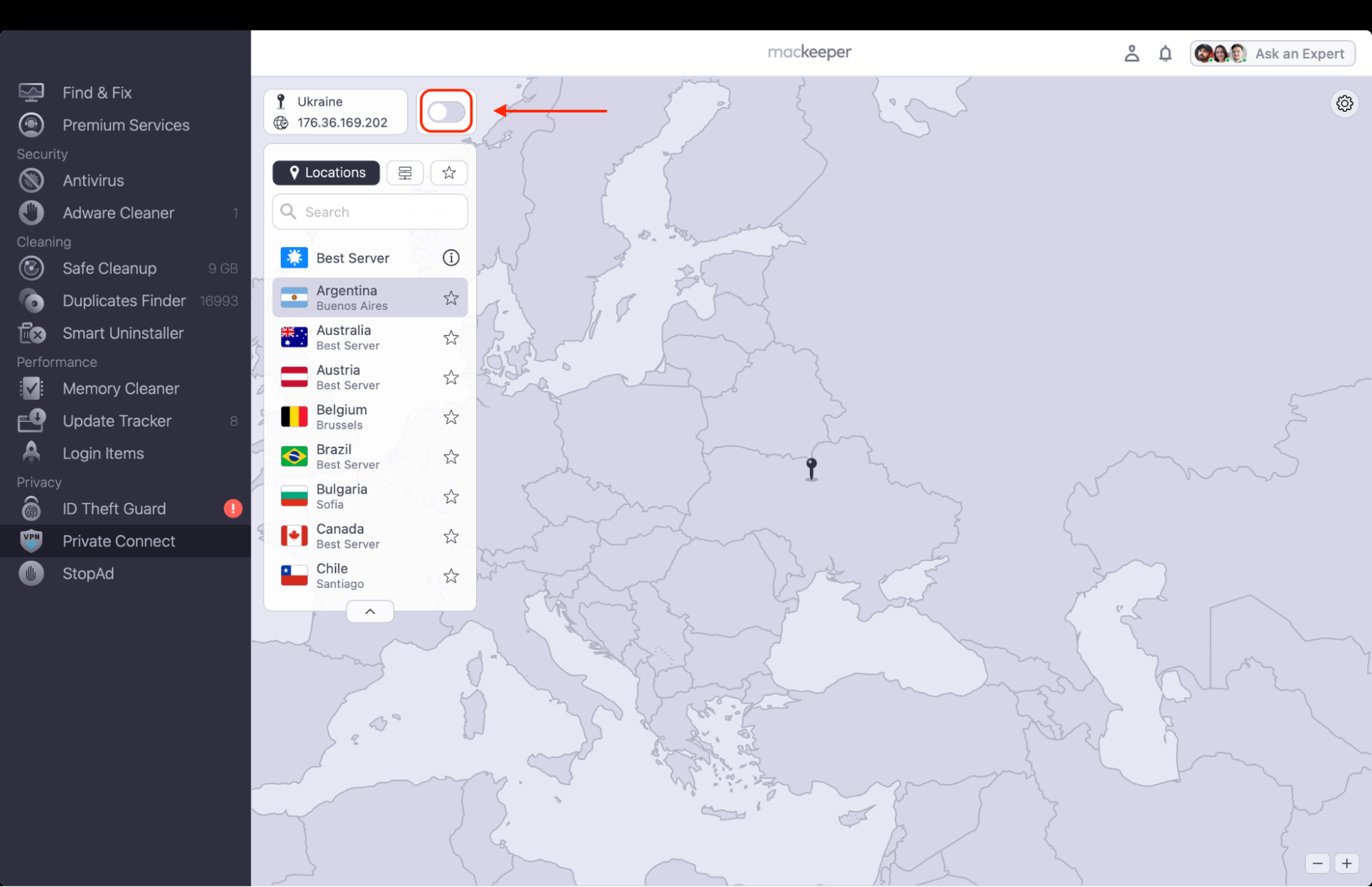
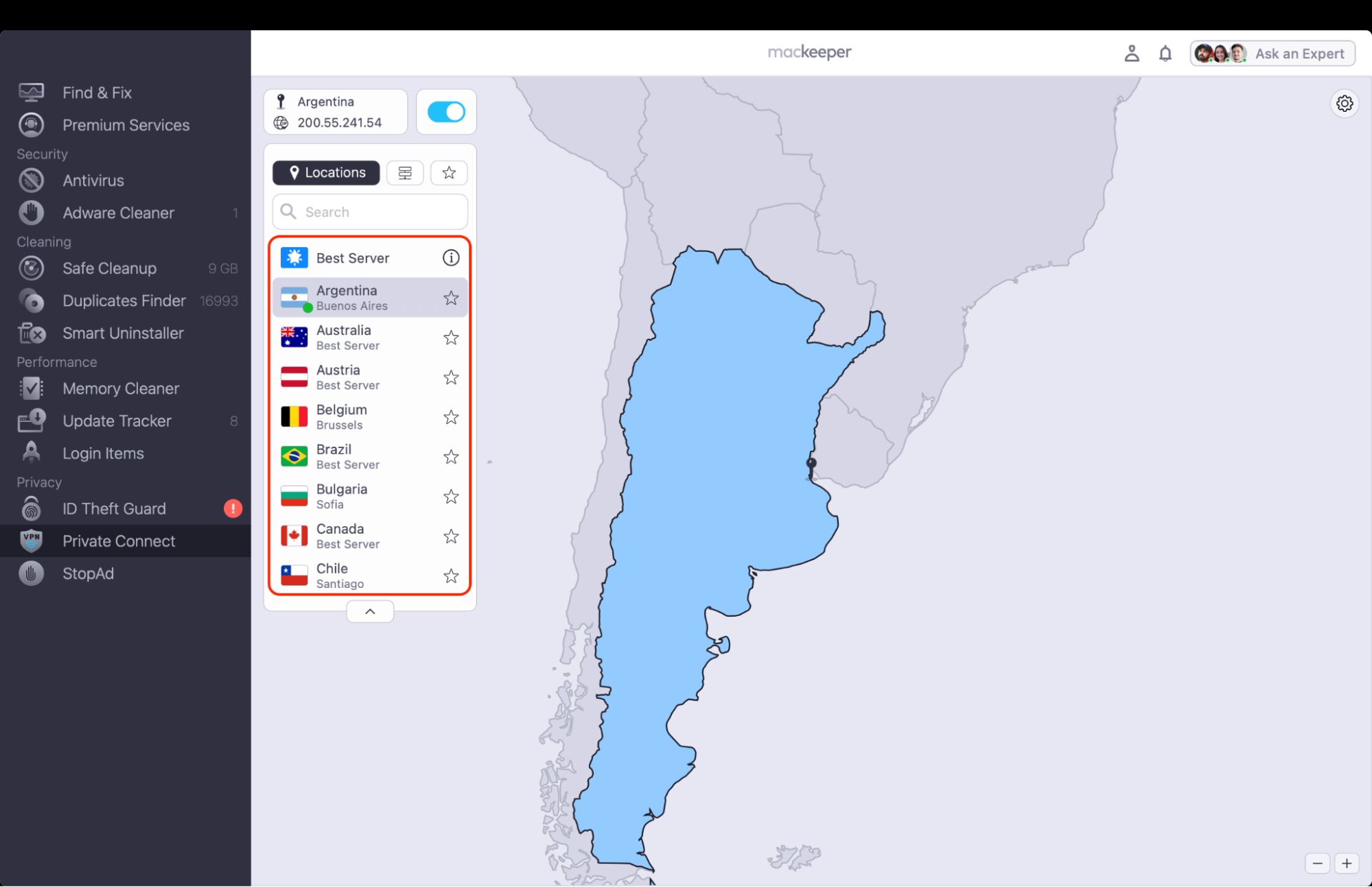
To protect your privacy with MacKeeper’s VPN Private Connect:
Open the app and go to the VPN Private Connect section from the left sidebar.
Enable the connection by toggling the switch next to your location section.
Choose your preferred location.
Step 1. Open the app, go to the Private Connect section from the left sidebar, and toggle the switch onStep 2. Choose your preferred location
Avira Phantom VPN features
Avira Phantom VPN keeps its feature set deliberately simple. As our tests show, here are the main features you should know about before you decide:
Encryption: AES 256-bit encryption over OpenVPN and IKEv2 protocols.
Platforms: apps for macOS, Windows, Android, and iOS, plus a browser extension.
Server access: around 1,400 servers across 37 countries on the Pro plan.
Device limit: unlimited simultaneous connections on paid plans.
Free plan: limited to 500 MB per month, or 1 GB if you register an account, with no kill switch.
Paid extras: a kill switch, unlimited data, and priority customer support.
Need to jump between regions? Our guide on how to change VPN location on MacBook explains the steps for any VPN you use.
Security and privacy: Avira Phantom VPN
Avira protects your traffic with industry-standard AES 256-bit encryption, and in our leak tests, we found no DNS, IP, or WebRTC leaks—a solid result. From what we can tell, the bigger consideration is jurisdiction: Avira is headquartered in Germany, and while it says it doesn’t track the sites you visit, it isn’t a fully audited zero-logs service.
For privacy-conscious users, that means weighing strong encryption against limited transparency. If logging policy is your top priority, you’ll want a provider that publishes independent audits.
Avira Phantom VPN security settings in the macOS app
Avira Phantom VPN speed and performance
Speed is where this VPN gets uneven. In our experience, nearby servers feel quick enough for everyday browsing, but performance drops off noticeably the farther you connect, and recent third-party tests recorded heavy download-speed losses on distant locations.
Your results will depend on server distance, connection quality, and whether you’re streaming, downloading, or just reading email. If you ever want to free up bandwidth, learning how to turn off VPN on Mac takes only a couple of clicks.
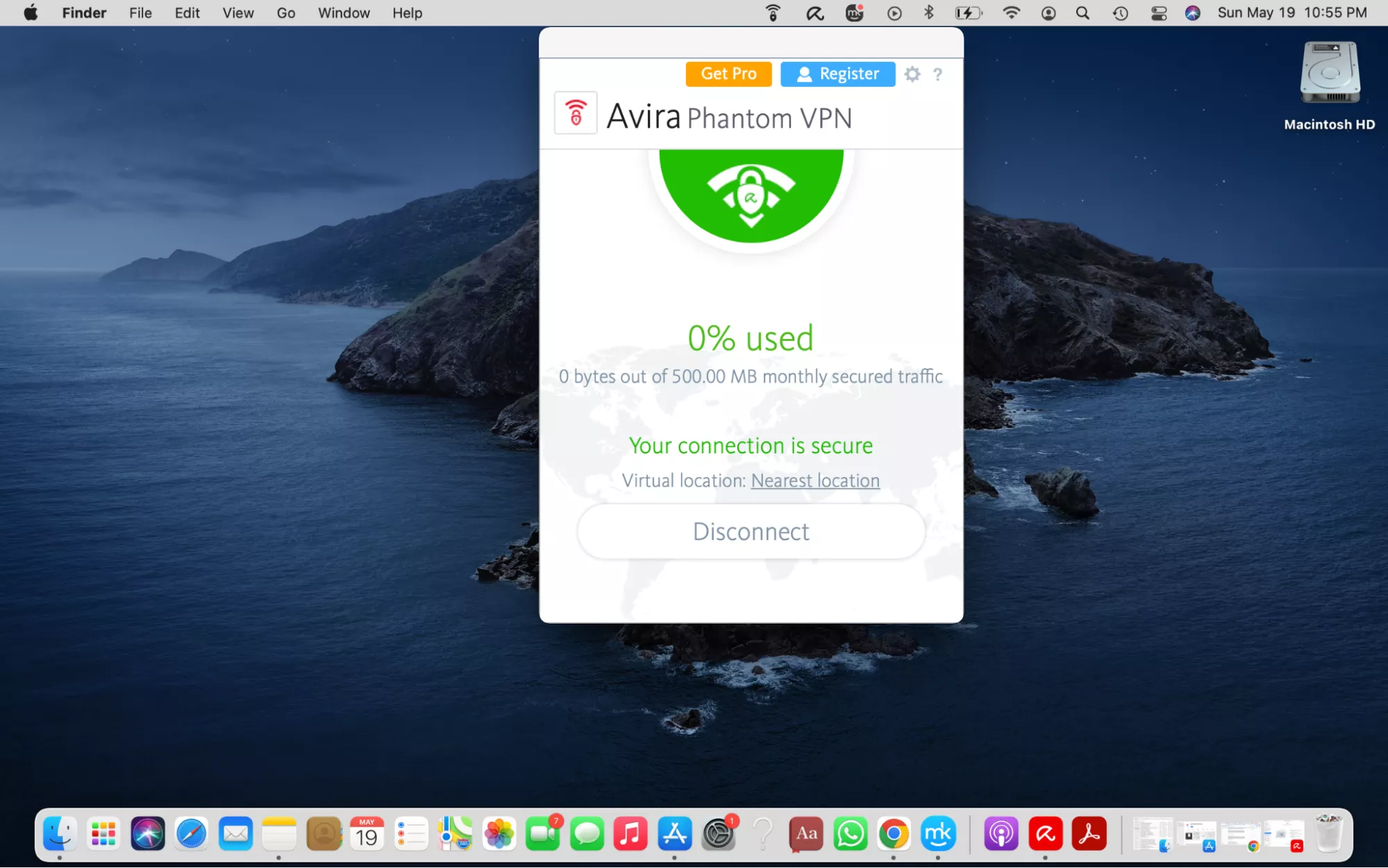
Avira Phantom VPN connection screen on macOS
Avira Phantom VPN for streaming
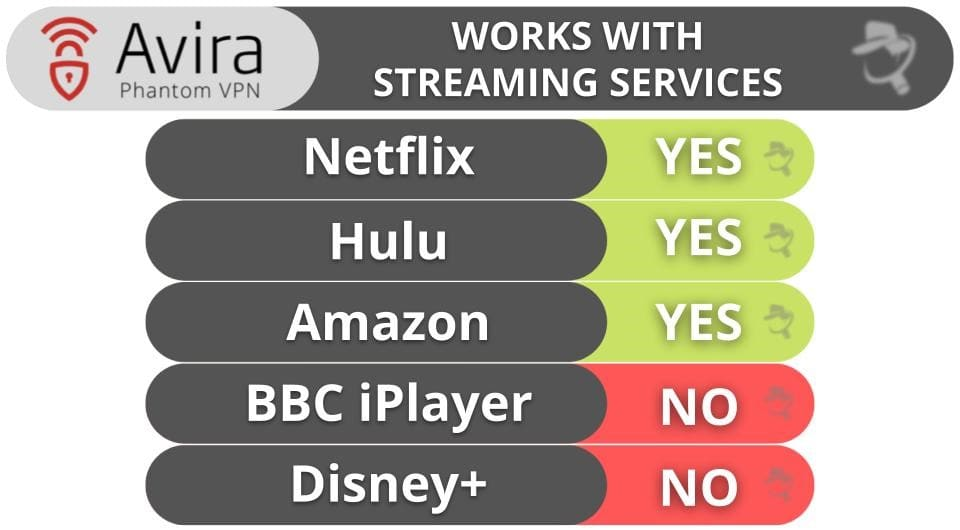
Can you stream with it? Sometimes. During our testing, Avira Phantom VPN unblocked several Netflix libraries and worked with services like Amazon Prime Video and Peacock, but access was inconsistent—expect longer-than-usual load times and occasional buffering. It also struggles with tougher platforms such as Disney+ and BBC iPlayer, so it’s fine for casual viewing rather than serious binge-watching.
Avira Phantom VPN streaming a Netflix library on macOS
Pricing of Avira Phantom VPN
Avira keeps its pricing simple but on the expensive side for a standalone VPN. As our tests show, the annual plan offers the best value, while the monthly option is hard to justify next to cheaper rivals. You can also get the VPN bundled inside the Avira Prime security suite. Here’s a quick breakdown:
Plan
Price
Best for
Free
$0 (500 MB/month, 1 GB if registered)
Testing the service
Monthly
Around $7.95/month
Short-term use
Annual
Around $59.95/year (~$5/month)
Best overall value
Mobile-only
Around $2.95/month
Phone-only users
All paid plans come with a 60-day money-back guarantee, which gives you plenty of time to decide.
Avira Phantom VPN apps and ease of use
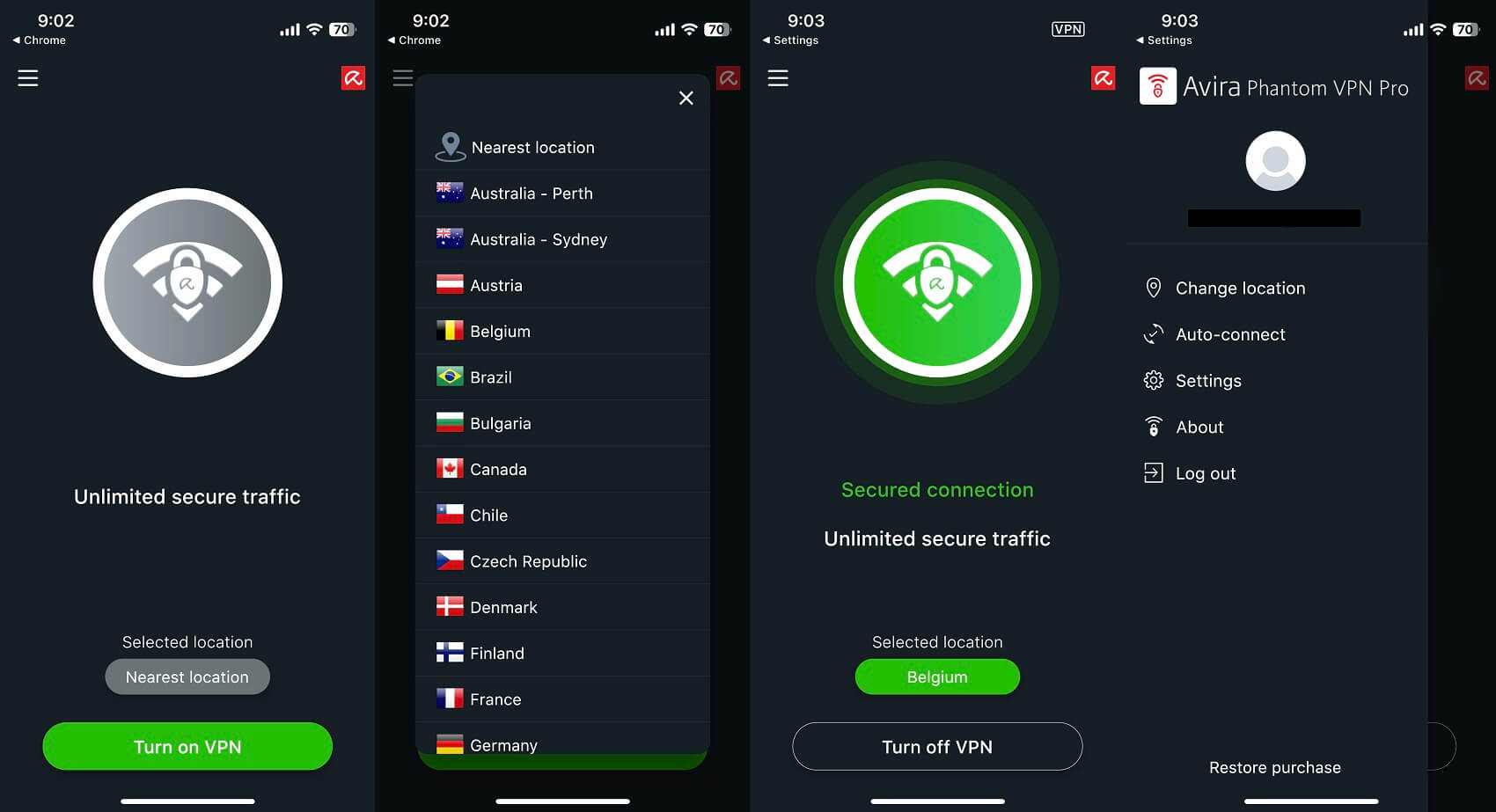
This is Avira’s strongest area. From our experience, setup takes minutes on any supported device, the interface is uncluttered, and switching servers is a single tap. Settings are minimal, which is great for beginners but limiting if you like to fine-tune protocols and tunneling options.
And if you ever decide it’s not for you, our guide on how to uninstall VPN from Mac removes the app cleanly, leftovers included.
Avira Phantom VPN customer support
Support is functional but basic. Paid users get access to email and a knowledge base, while live chat is reserved for premium tiers and, in our experience, wasn’t always available. It’s adequate for quick how-to questions, but if you run into a complex technical issue, you may find the responses generic rather than precise.
Unfortunately, there's no 24/7 phone line for everyday users and no in-app live troubleshooting, so resolving anything beyond the basics often means waiting on email replies. If round-the-clock, hands-on help matters to you, this is one area where Avira Phantom VPN trails the better-supported VPNs we've tested.
Conclusion
Is Phantom VPN Avira review coverage worth your time? On balance, Avira Phantom VPN is a reliable, easy-to-use VPN with strong encryption, a handy free version, and unlimited device support, but its inconsistent speeds, thin feature set, and high standalone price hold it back. It’s a sensible pick for casual users and Avira fans, less so for anyone who needs advanced privacy controls or dependable streaming.
If you’d rather have effortless, always-on protection built right into your Mac, MacKeeper’s VPN Private Connect is the cleaner alternative. MacKeeper is a macOS utility software that encrypts your traffic and masks your IP address automatically the moment your Mac starts, so you stay private and secure on any network.
We respect your privacy and
use cookies
for the best site experience.
Privacy Preferences Center
We use cookies along with other tools to give you the best possible experience while using the
MacKeeper website. Cookies are small text files that help the website load faster. The cookies we
use don’t contain any type of personal data meaning they never store information such as your
location, email address, or IP address.
Help us improve how you interact with our website by accepting the use of cookies. You can change
your privacy settings whenever you like.
Manage consent
All cookies
These cookies are strictly necessary for enabling basic website functionality (including page
navigation, form submission, language detection, post commenting), downloading and purchasing
software. The website might malfunction without these cookies.