Comparing MacBook Air vs. Pro? Of all the key features shoppers consider when looking for a new computer, performance is often at the top of the list. Please note that you can enhance the performance of even your old machine using a few tools and practices. For instance, MacKeeper’s Memory Cleaner is a fast, safe, and reliable tool that can help you optimize your Mac by freeing up memory and closing useless apps.
In the market for a new shiny Mac? We know how daunting it is to decide between the MacBook Pro and MacBook Air, especially when the owners of both devices sing their praises. Truthfully, both machines are great picks. Each model is fast, reliable, and durable… But could the MacBook Pro be a better choice?
Check the main differences between MacBook Pro and MacBook Air for a quick plunge into the topic.
Note: This table focuses on the MacBook Pro model with 14-inch and 16-inch display and contains the M2 Max chip.
MacBook Air
MacBookPro
Storage options: 256GB, 512GB, 1TB, 2TB
Storage options: 512GB, 1TB, 2TB, 4TB, 8TB
Unified memory: 8GB, 16GB, or 24GB
Unified memory: M2 Pro options include 16GB or 32GB unified memory, while M2 Max options include 32GB, 64GB, or 96GB unified memory
13.6-inch display
14.2-inch and 16.2-inch display options
Apple M2 chip
Apple M2 Pro chip or Apple M2 Max chip
LCD Liquid Retina display
Mini-LED Liquid Retina XDR display with ProMotion
500 nits brightness
Up to 1,000 nits of sustained full-screen brightness and 1,600 nits of peak brightness
10-core GPU
M2 Pro offers up to 19-core GPU while M2 Max offers up to 38-core GPU
8-core CPU with four performance cores and four efficiency cores
Up to 12-core CPU with eight performance cores and four efficiency cores
100GB/s memory bandwidth
Up to 400GB/s memory bandwidth
18-hour maximum battery life
18- or 22-hour maximum battery life
Integrated 52.6-watt-hour lithium-polymer battery
Integrated 70-watt-hour or 100-watt-hour lithium-polymer battery
Wi-Fi 6
Wi-Fi 6E
Bluetooth 5.0
Bluetooth 5.3
Four-speaker sound system
High-fidelity six-speaker sound system with force-cancelling woofers
Two Thunderbolt/USB 4 ports
Three Thunderbolt 4 (USB-C) ports
N/A
HDMI 2.1 port with support for multichannel audio output
N/A
SDXC card slot
30W, 35W, or 67W USB-C Power Adapter
67W, 96W, or 140W USB-C Power Adapter
Three-mic array with directional beamforming
Studio-quality three-mic array with high signal-to-noise ratio and directional beamforming
A note from our experts:
Whether you choose a MacBook Air or MacBook Pro, you'll need a reliable tool to optimise, clean, and protect it. MacKeeper is a universal tool for your Mac. Try its Memory Cleaner to get the most out of your Mac's memory.
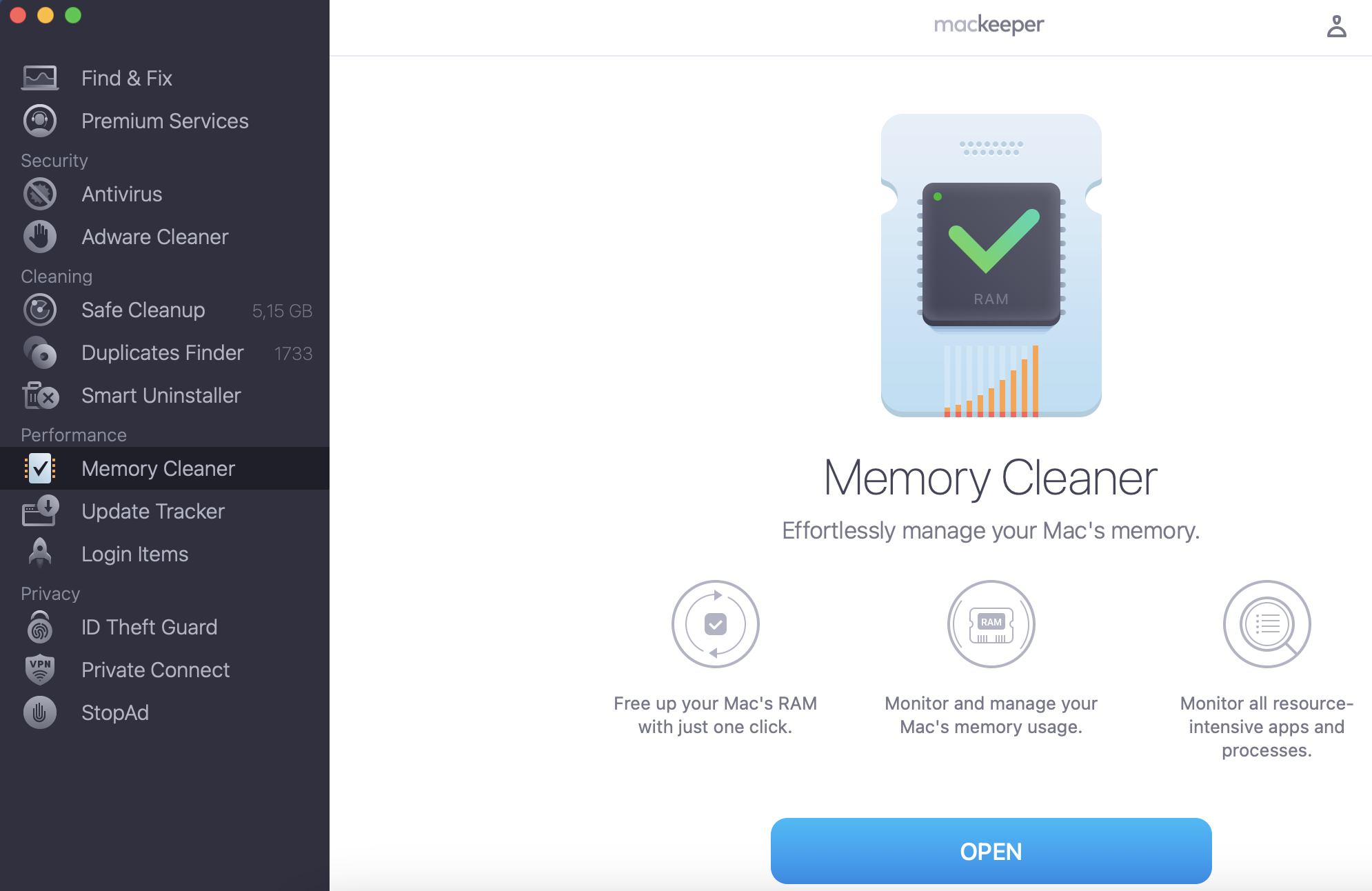
Select Memory Cleaner in the Performance section on the left.
Click the Open button at the bottom of the screen.
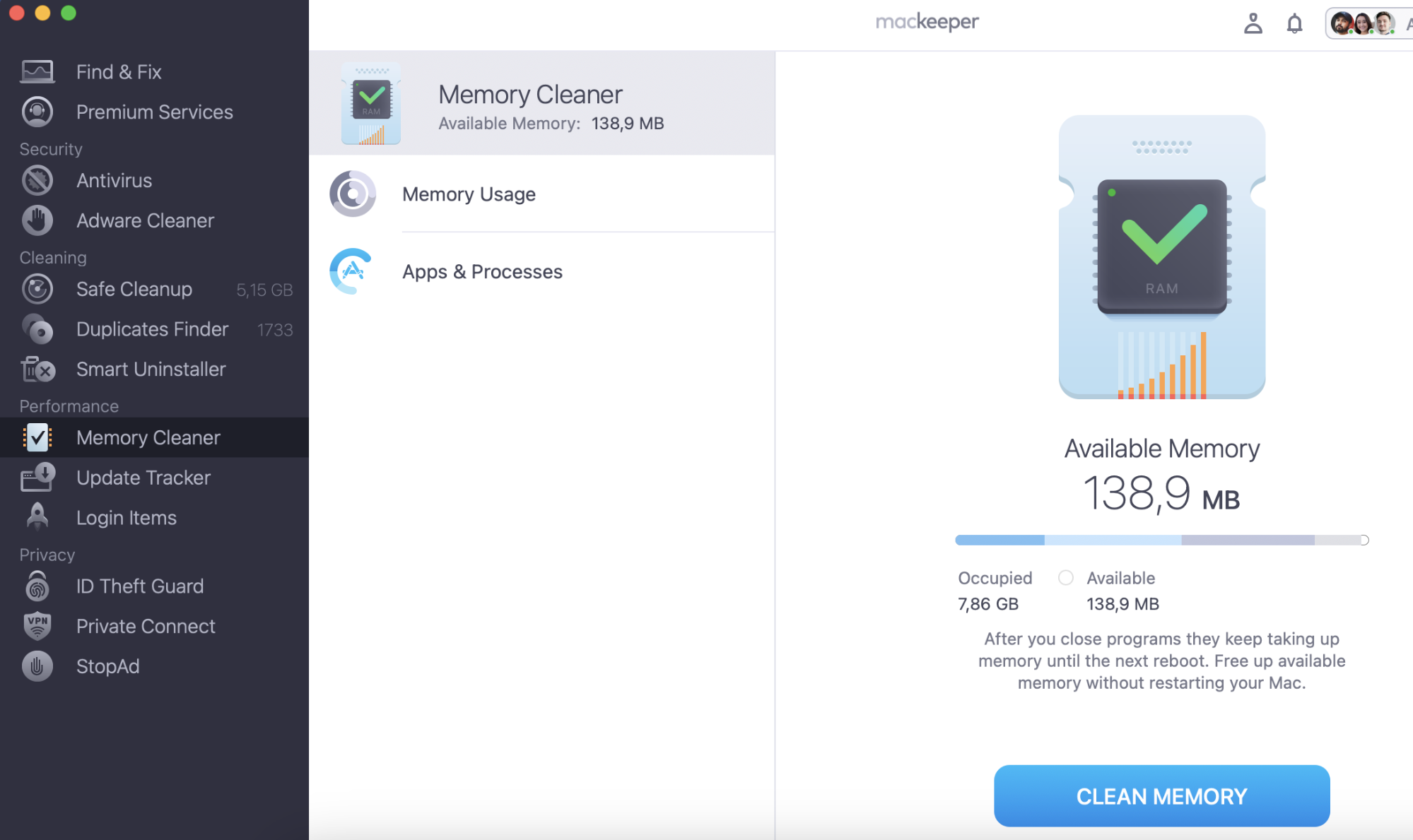
MacKeeper will show you details about how much memory is occupied and how much is available. Click Clean Memory and be patient while MacBook optimizes your Mac.
Deciding on the MacBook device you need is a crucial decision. We’ve made it easier by breaking down the key factors to consider. Continue reading to learn more about the MacBook Air and MacBook Pro devices.
Value and price
Mac devices don’t come cheap, but some are more affordable than others. Here are the starting prices for MacBook Pro and Air devices:
MacBook Air (2020): $999
13-inch MacBook Pro (2020): $1,299
14-inch MacBook Pro: $1,999
16-inch MacBook Pro: $2,499
13-inch MacBook Pro (2022): $1,299
MacBook Air M2: $1,199
14-inch MacBook Pro (2023): $1,999
16-inch MacBook Pro (2023): $2,499
14-inch MacBook Pro (2025): $1,599
16-inch MacBook Pro (2025): $2,499
13-inch MacBook Air (2025): $999
15-inch MacBook Air (2025): $1,199
Remember: Newer models never come cheap due to the improvements added to them and other factors. So, if you’re looking to get your hands on a brand-new Mac, whether it’s a MacBook Pro or MacBook Air, it'll be more expensive than older devices.
Specs
Below are the main specifications for MacBook Pro and MacBook Air devices from 2020 through 2021.
MacBook Air (2020)
13-inch MacBook Pro (2020)
14-inch MacBook Pro (2021)
16-inch MacBook Pro (2021)
Starting price
$999
$1299
$1,999
$2499
Screen
13.3 inches
13.3 inches
14.2 inches
16.2 inches
Dimensions
12 x 8.4 x 0.6 inches
12 x 8.4 x 0.6 inches
12.31 x 8.71 x 0.61 inches
14.01 x 9.77 x 0.66 inches
Weight
2.8 pounds
3 pounds
3.5 pounds
4.7 to 4.8 pounds
Battery life
Up to 18 hours of video playback (M1)
Up to 20 hours (Apple M1)
Up to 17 hours of video playback
Up to 21 hours of video playback
Storage
256GB, 512GB SSD, 1TB, or 2TB
512GB, 1TB, or 2TB
1TB, 2TB, 4TB, or 8TB SSD
1TB, 2TB, 4TB, or 8TB SSD
Memory
8GB, 16GB
8GB, 16GB, 32GB
16GG, 32GB
16GB, 32GB, 64GB
Processor
Apple M1 (8-core)
Apple M1 (8-core)
Apple M1 Pro, M1 Max (10-core)
Apple M1 Pro, M1 Max (10-core)
Graphics
Integrated 7-core M1 GPU | Integrated 8-core GPU
Integrated 7-core M1 GPU | Integrated 8-core GPU
16-core or 32-core
16-core or 32-core
Touch bar
No
Yes
No
No
Ports
2 Thunderbolt
2 Thunderbolt
3 Thunderbolt, HDMI, SD Card, MagSafe
3 Thunderbolt, HDMI, SD Card, MagSafe
Security
Touch ID
Touch ID
Touch ID
Touch ID
Audio
Stereo speakers, Dolby Atmos support
Stereo speakers, Dolby Atmos support, 3-mic array
6-speaker array, Dolby Atmos support
6-speaker array, Dolby Atmos support
Now check the key comparison details for Apple devices released between 2022 and 2023.
13-inch MacBook Pro (2022)
MacBook Air with M2 (2022)
14-inch MacBook Pro (2023)
16-inch MacBook Pro (2023)
Starting price
$1,299
$1,199
$1,999
$2,499
Screen
13.3 inches
13.6 inches
14.2 inches
16.2 inches
Dimensions
11.94 x 8.36 x 0.61 inches
11.97 x 8.46 x 0.44 inches
12.31 x 8.71 x 0.61 inches
14.01 x 9.77 x 0.66 inches
Weight
3 pounds
2.7 pounds
3.5 pounds
4.7 to 4.8 pounds
Battery life
Up to 20 hours of Apple TV movie playback
Up to 18 hours
Up to 24 hours
Up to 22 hours Apple TV app movie playback and up to 15 hours wireless web browsing
Storage
512GB, 1TB, or 2TB
512GB, 1TB, or 2TB
1TB, 2TB, 4TB, or 8TB
1TB, 2TB, 4TB, or 8TB
Memory
8GB to 24GB
8GB to 24GB
16GB to 96GB
16GB to 96GB
Processor
Apple M2 (8-core)
Apple M2 (8-core)
Apple M2 Pro, M2 Max
Apple M2 Pro, M2 Max
Graphics
Integrated 8-core M2 CPU | Integrated 10-core GPU
Integrated 8-core M2 CPU | Integrated 8-core GPU
M2 Pro/Max Up to 12-core CPU | Up to 38-core GPU
M2 Pro/Max Up to 12-core CPU | Up to 38-core GPU
Touch bar
Yes
No
No
No
Ports
2 Thunderbolt/USB4, headphone jack
2 Thunderbolt / 1 USB-4, 1 headphone
3 Thunderbolt, HDMI, SD Card, MagSafe
3 Thunderbolt, HDMI, SD Card, MagSafe
Security
Touch ID
Touch ID
Touch ID
Touch ID
Audio
Stereo speakers, Dolby Atmos support, 3-mic array
Four-speaker sound system, spatial audio and Dolby Atmos support
6-speaker array, Dolby Atmos support
6-speaker array, Dolby Atmos support
CPU
First things first: CPU is a term you’ve probably heard countless times, but what does the acronym “CPU” stand for, and what does it mean?
A computer’s central processing unit (CPU) is the core of your computer’s performance. It’s sometimes referred to as a processor or microprocessor. Think of it as the brains of your computer, which stores data, intermediate results, and programs. A computer’s CPU controls all the processes and operations of a computer and plays an integral role in how well it performs.
Both MacBook Pro and Air devices are fast for everyday use. Each device scored high on Geekbench’s single-core tests, which evaluate device CPU performance.
The MacBook Pro with Apple M2 Max (16-inch, 2023) came out on top with a score of 2732. It was followed by the MacBook Pro with Apple M2 (16-inch, 2023, which scored 2638), and the MacBook Pro with Apple M2 Pro (14-inch, 2023, which scored 2633). The MacBook Pro with Apple M2 (13-inch, 2022) and MacBook Air with Apple M2 (2022) devices scored lower at 2577 and 2560 respectively.
When looking at CPU performance alone, the 2023 MacBook Pro models are the best.
GPU
MacBook Pro and MacBook Air devices have similar core GPUs. However, MacBook Air models might be a bit slower if you overwork them because of other factors. For instance, to keep MacBook Air computers slim in design, Apple opted not to include fans in these devices, which makes them ill-equipped to handle high temperatures or overheating. As a result, MacBook Air devices have to self cool. This pressure can cause them to perform slowly.
RAM
The 13-inch MacBook Air with the Apple M1 chip is only offers up to 16GB of RAM. That can be too little or sufficient, depending on what you plan to use your Mac for. If you’ll be using it to store lots of video content or use many memory-intensive apps for work or personal use, you may find 16GB of RAM limiting.
In that case, you might want to consider the 14- and 16-inch MacBook Pro models, which offer a maximum of 96GB of RAM. This would be a better option for photographers, videographers, and content creators.
Storage
Both MacBook options offer a ton of storage, with the lowest option being 256GB for the MacBook Air and 512GB for the MacBook Pro. MacBook Pro devices can offer up to 8TB of storage, while MacBook Air devices are capped at 2 TB.
Design
When you walk into the iStore and check out the MacBook devices on display, you can immediately spot the apparent differences between the two computers. But they have similarities, too.
For example, both devices have smooth aluminum surfaces and come in Apple’s signature colors, silver and space gray. Both devices have the lip that Apple computers are known for, which makes it easy to flip them open. The Air ditched its signature tapered design, making it look more similar to the Pro.
However, MacBook Pro and MacBook Air devices are designed to look and different, and everyone has their preferences. Here’s how the two devices differ in design:
MacBook Air computers are lighter, therefore more portable and convenient to carry around, given that they weigh under 3 pounds
Pro devices have larger screens at 14 and 16 inches, compared to Air devices, which are around 13 inches
MacBook Air devices have more color options than Pro devices. The M1 MacBook Air offers a Gold option, while the M2 MacBook Air comes in Starlight and Midnight options, too
13-inch MacBook Pro models feature a distinctive Touch Bar strip, which has since been removed for newer models.
Ports and Connectivity
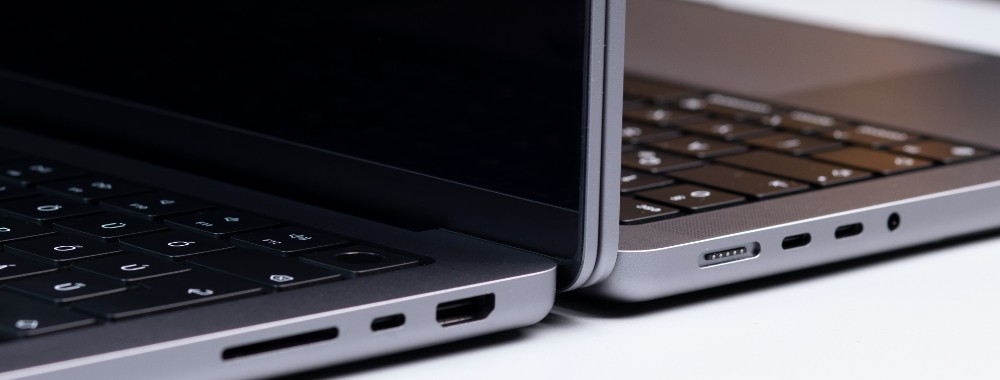
Depending on what you plan to use your MacBook device for, the number of ports available on each laptop could be a deciding factor. If you need multiple ports, the Air and M1 13-inch MacBook Pro aren’t for you, as they feature two Thunderbolt 3 ports and two Thunderbolt 3/USB-C ports, respectively. (M2 devices also offer two ports, although they're Thunderbolt 4/USB4.) Of course, there’s an option of using an adapter.
Instead, the 14-inch and 16-inch MacBook Pro devices would be what you need. Here are the ports they come with:
An HDMI port
Three Thunderbolt 4 ports
An SD Card slot.
What’s more, these MacBook Pro devices have MagSafe chargers for safe, quick, wireless charging.
If you’re an entrepreneur or business owner, you might need something with more ports, but there are more factors to consider. Learn which is the best Apple laptop for business.
Display (Technology & Size)
When it comes to display, you won’t be disappointed with either device, but MacBook Pros have a significant advantage over MacBook Airs: More vivid displays.
Instead of Retina, The M2 MacBook Air offers a Liquid Retina display, which gives it an improved contrast and allows it to support more colors. Be that as it may, it doesn’t compare to the Liquid Retina XDR displays in the high-end MacBook Pro models, which boast a maximum of 1,000 nits of brightness, ProMotion, more vivid colors, and even deeper blacks.
Keyboard and Touch Bar
What sets MacBook apart from other computers is the flat keyboard surface. It makes typing comfortable, unlike the clunky keys on other laptops that give feedback. It makes for a more stable typing experience, which can help you work faster. However, there’s one small but insignificant difference between MacBook Air and Pro keyboards.
13-inch MacBook Pro devices include a Touch Bar that runs at the top of the keyboard. However, it wasn’t well-received, so Apple ditched it in later models.
Performance
One of the main factors every computer buyer is concerned with is performance, and rightfully so. The last thing you want to deal with is lagging while working on your computer. And after spending your hard-earned cash on a shiny new device, you don’t want to be stressed by poor performance, like your computer randomly freezing or shutting down, or the battery depleting fast.
Generally speaking, all MacBook devices deliver impressive performance, so you should only consider this metric if you need a high-performing machine. But if we’re splitting hairs, newer devices perform better, like the 14-inch and 16-inch MacBook Pros. That’s why they’re so expensive.
Go for these machines if your work depends on it. It’s particularly tailored for IT and tech professionals, creatives, etc. Of course, if you don’t fall into any of these categories but have more money to throw around, you can get one of these models, too. However, it isn’t necessary, and you’d still get value for your money if you chose a MacBook Air.
The 14-inch and 16-inch MacBook Pro 2023 models boast the best battery life of up to 24 hours and 22 hours, respectively. MacBook Air models average about 18 hours max. With each new release, Apple aims to improve the battery life of its computers. For that reason, newer models will almost always perform better than older ones, even if the difference is minor.
Keep in mind that how you use your computer also determines the longevity of the battery and its lifespan. For example, apps running in the background and power-intensive programs can put a lot of strain on your battery, causing it to deplete faster.
Audio
Both MacBook Pro and MacBook Air devices offer decent sound. However, MacBook Pro devices take the cup for several stand-out features. These include the high-fidelity six-speaker feature with force-canceling woofers that comes with the 14-inch and 16-inch models, and Dolby Atmos support in newer models. Needless to say, music buffs and professionals would appreciate these features, as they provide a deeper audio experience.
When you compare MacBook Air and Pro, which device is best or worth buying for yourself? If you’re looking to buy your first MacBook for the experience and have a limited budget, the MacBook Air will give you a great first-time user experience. You can always upgrade when you’re ready and comfortable.
But if money isn’t an issue, and you want to get the best of the best, MacBook Pro laptops are the way to go. Truthfully, any model would do—older models are more affordable and newer ones come with all the bells and whistles. If you can, get the latest model to enjoy the best that Mac has to offer.
Still stuck on which MacBook to get? Consider the pros and cons of MacBook Air and MacBook Pro devices once again.
MacBook Air
MacBook Pro
Pros
Cheaper
M2 chips offer amazing performance
Lighter and more compact
Best battery life
More color options available if you want to stand out
More ports available
M2 chips offer great performance
Classic design
Offers up to 96GB of memory
Better displays
Cons
Camera notch ruins the display
Costly
Limited ports available
Limited color options
One of the biggest deciding factors when looking to purchase a tech device is its performance. No matter what you’ll use it for, you want to ensure it won’t let you down. There are many ways to support your Mac in this regard, like closing unnecessary apps and switching your Mac off properly after use.
But there’s a more effective method. Regardless of which Mac model you go for, prioritize using MacKeeper’s Memory Cleaner to support its performance and keep it working at its best. Use it regularly to optimize your Mac faster than you could do so yourself, so you can focus on what’s important: work and entertainment.
We respect your privacy and
use cookies
for the best site experience.
Privacy Preferences Center
We use cookies along with other tools to give you the best possible experience while using the
MacKeeper website. Cookies are small text files that help the website load faster. The cookies we
use don’t contain any type of personal data meaning they never store information such as your
location, email address, or IP address.
Help us improve how you interact with our website by accepting the use of cookies. You can change
your privacy settings whenever you like.
Manage consent
All cookies
These cookies are strictly necessary for enabling basic website functionality (including page
navigation, form submission, language detection, post commenting), downloading and purchasing
software. The website might malfunction without these cookies.