The Malwarebytes vs MacKeeper comparison will give you a detailed understanding of the range of functions the apps possess. Still, we’d like to note that Malwarebytes is focused only on security functions, while MacKeeper can satisfy your other Mac needs. Surely, MacKeeper’s Antivirus can help you protect from malware, but the app also offers additional tools helping you clean and optimize your device.
Security software is a dime a dozen. Therefore, choosing the best virus protection for Mac shouldn’t be taken lightly. Malwarebytes and MacKeeper are two of the most popular offerings on the market. When selecting between the software, it’s essential to compare them based on key categories, such as features they offer, pricing, user experience, and performance.
The question should never be, “Do Macs get viruses?” Instead, it should be how to remove them and secure your device. In this article, we’ll review Malwarebytes and MacKeeper, which both offer antivirus protection for your Mac.
A note from our experts:
Have you ever tried MacKeeper’s Antivirus? It’s high time to try it out and compare it with Malwarebytes. Discover all the advantages of our tool by testing it in practice.
Malwarebytes is a popular cybersecurity tool known for its anti-malware software. The software was released by the Malwarebytes Corporation in January 2006 and is available on computers and mobile devices. Malwarebytes is known to detect malware infections that other platforms may miss.
1. Malwarebytes tools and features
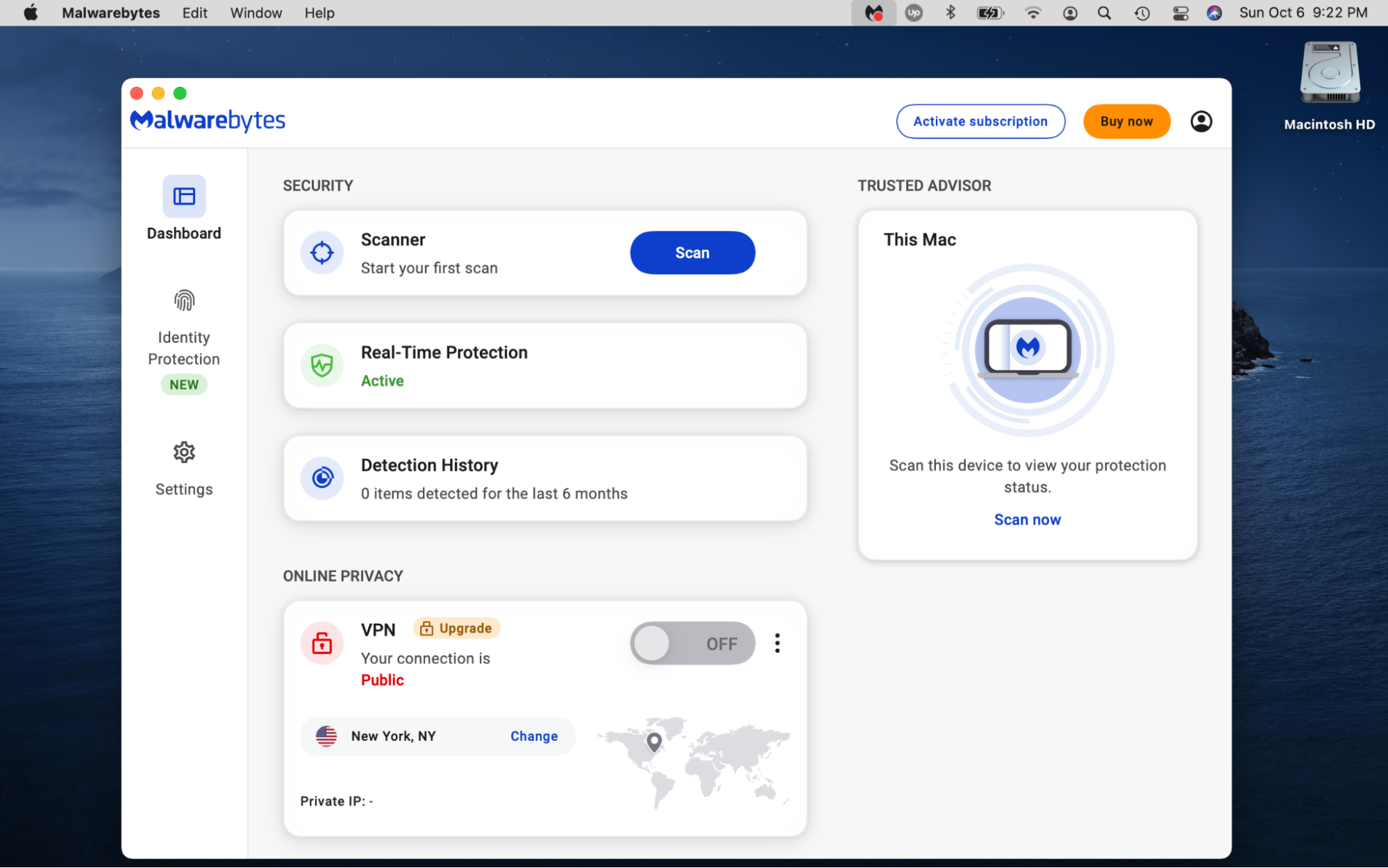
Here are the features and tools available in Malwarebytes:
Device Scanner
Real-Time Protection
Detection History
VPN
Identity Protection
API
Activity Dashboard
Reporting and Analytics
Activity Monitoring
Remote Access/Control
Alerts
IT, Server & Network Monitoring Software
Anomaly/Malware Detection
Anti Spam
Two-Factor Authentication
Anti Virus
Network Security Software
Risk Management Software
Application Security
Reporting/Analytics
Backup and Recovery
Data Security
Secure Data Storage
Reporting & Statistics
Endpoint Protection Software
Threat Intelligence Platform
Automatic Backup
Monitoring
Disaster Recovery Software
Remediation Management
Risk Assessment
Network Provisioning
Secure Login
Third-Party Integrations
Remote Monitoring & Management
Event Analysis
Threat Response
IT Reporting
2. How much does Malwarebytes cost?
Malwarebytes has a free tier and two paid tiers: Standard and Plus. Its Standard tier covers one device at $44.99 annually (or $3.75/month). The Plus tier also covers one device but is slightly more costly at $59.99 annually (or $5/month). Unlike the free and Standard tiers, this is because it offers a VPN service.
3. How reliable is Malwarebytes' virus protection?
Malwarebytes offers relatively good, not perfect, malware protection. In October 2023, AV-Test scored 5.5 out of 6 for performance on Windows. AV-Test hasn’t tested Malwarebytes on MacBook devices. Additionally, it didn’t appear on AV-Test’s list of the best macOS antivirus software for home users in June 2024.
4. Malwarebytes customer support
Malwarebytes support page has an AI chatbot functionality that you can use to get assistance. In the chatbot, you can select the category you need help with. The categories include options to:
Manage your account and billing
Get help with a product
Get information about data and privacy
Receive support regarding Identity Theft Protection
If required, you can ask the bot to connect you to a live agent for further assistance.
5. How does using Malwarebytes affect the performance of the computer?
As an antivirus program, Malwarebytes constantly runs in the background of your computer to protect it against malware threats in real time. Naturally, this means it will impact your Mac’s performance. Malwarebytes is lighter on system resources compared to other antivirus software. However, you can expect it to slow down your Mac somewhat, as it consumes CPU resources, although not significantly.
6. What is Malwarebytes compatible with?
Malwarebytes is compatible with the following devices:
MacBook
Windows
iOS
Android
Chromebook
However, some features are only available on certain devices. For instance, Malwarebytes’ AdwCleaner is only available on Windows devices.
7. Malwarebytes pros and cons
Malwarebytes certainly offers several benefits to users seeking to protect their computers against online threats. However, it also has its drawbacks. Compare its advantages and disadvantages in the table below to determine whether it could be the right solution for your antivirus protection needs.
Here are the pros and cons of using Malwarebytes antivirus:
Pros
Cons
Free version available
Lacks phone support
Effective malware detection and removal
Limited real-time protection in the free tier
Low CPU usage
No firewall
Doesn’t significantly dampen device performance
Compatible with multiple devices
MacKeeper review
MacKeeper is an exclusive-to-Mac utility that offers several privacy and security solutions, including an antivirus tool. In addition to fending off threats, MacKeeper helps optimize your Mac device, making it a comprehensive solution for your MacBook.
Here’s what its antivirus tool provides:
Real-time protection
Removes 99.7% of known threats
Notarized by Apple
Performs custom and background scans
1. Features of MacKeeper
MacKeeper’s robust suite of features includes:
Antivirus
Find & Fix
Safe Cleanup
ID Theft Guard
Smart Uninstaller
Login Items
Private Connect VPN
24/7 customer support
StopAd
Premium Services
Adware Cleaner
Duplicates Finder
Memory Cleaner
Update Tracker
2. Pricing MacKeeper
MacKeeper’s prices differ depending on the season and your location. However, regular prices typically start at $10.95/month, and MacKeeper regularly offers seasonal discounts you can take advantage of. We recommend checking the MacKeeper website and app for accurate pricing and discount offers.
3. How well can Mackeeper protect your Mac
MacKeeper is a stand-out cybersecurity utility that offers excellent real-time antivirus protection. It detects 100% of known threats, according to the AV-Test result conducted in March 2025. Such results make it one of the best antiviruses on the market. MacKeeper’s automatic virus scans do the hard work for you—discovering and presenting known threats to you, so you can remove them with the click of a button.
After removing threats, it continuously keeps an eye out for more, ensuring no new viruses and malware stand a chance of infecting your Mac. MacKeeper’s efficiency gives you peace of mind about your Mac’s security. From setting it up to warding off threats, MacBook owners who are interested in mastering how to check your Mac for viruses will find scanning with MacKeeper quite easy.
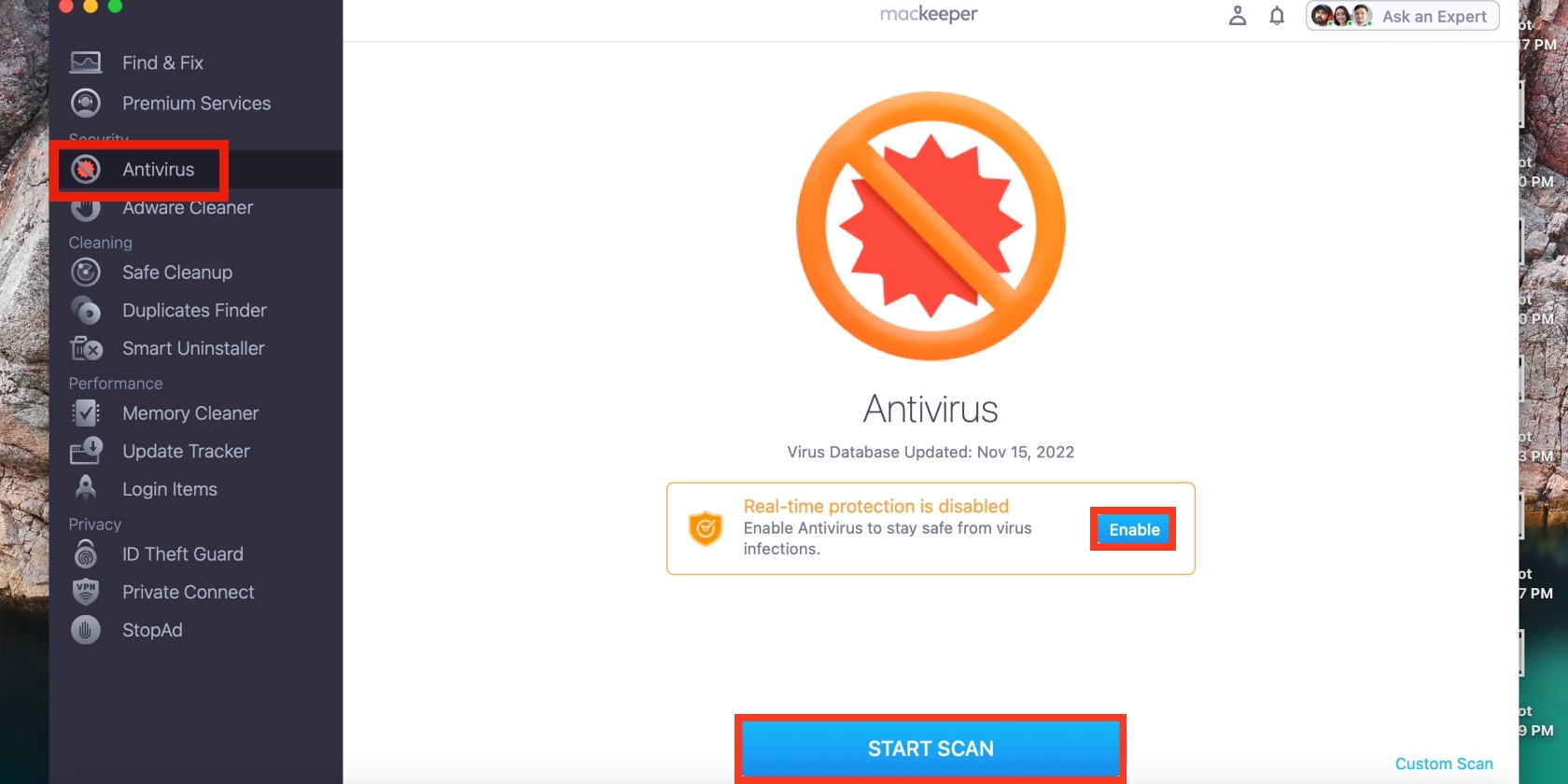
Follow the steps below to use MacKeeper’s Antivirus software:
Download MacKeeper on your MacBook model, such as MacBook Pro, Air, iMac, or Mac mini.
Open the app, choose the Antivirus option from the MacKeeper sidebar, and click Enable in the Real-time protection box.
Now click the Start Scan button to prompt MacKeeper to start looking for threats and follow its instructions to remove them when the scan is done.
4. MacKeeper customer support
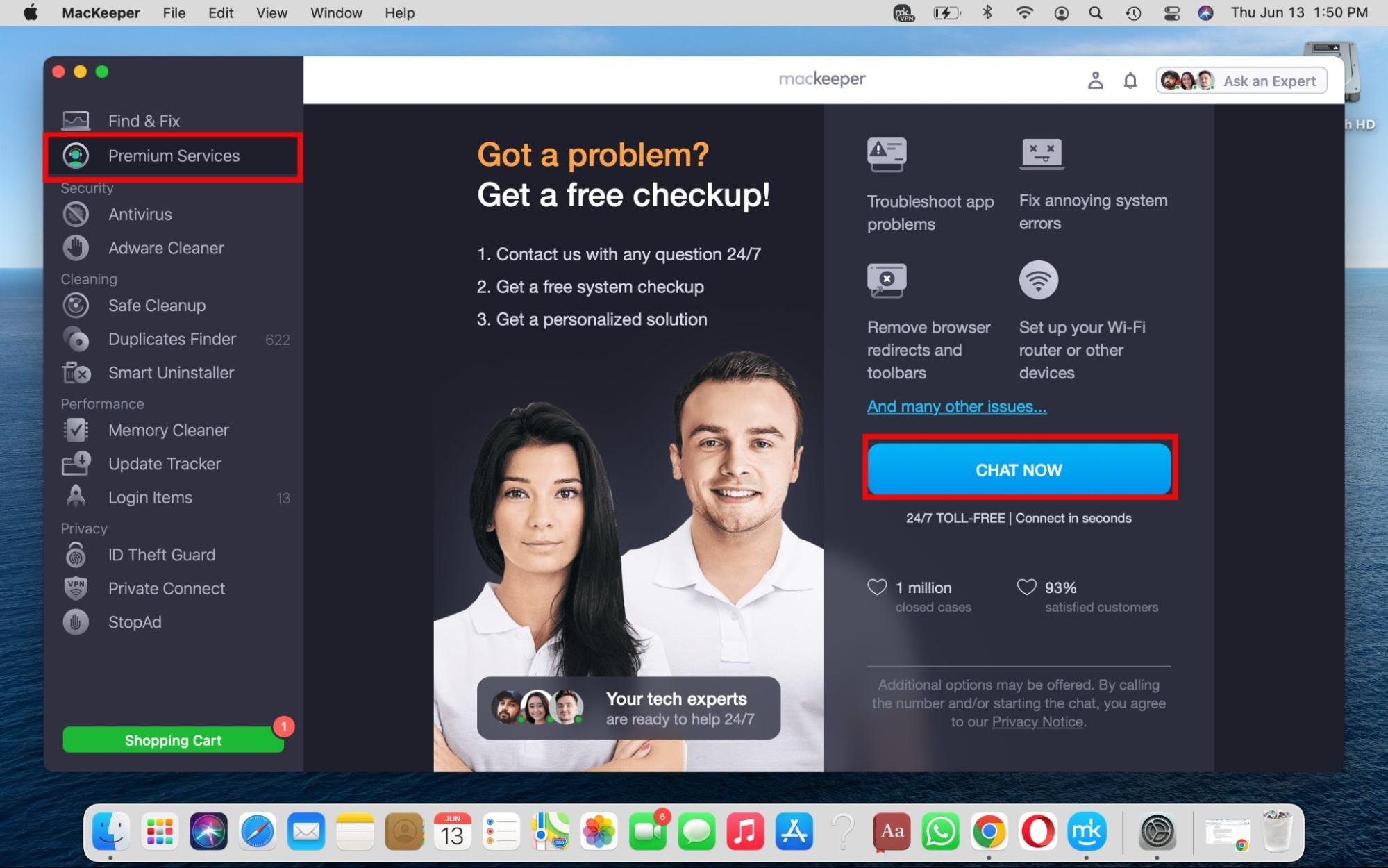
MacKeeper offers 24/7 in-app support through its Premium Services feature. If you encounter any issues with your MacBook, Premium Services allows you to chat with a MacKeeper tech expert within the app.
That’s right; with MacKeeper, you’ll never get stuck trying to reason with a bot that doesn’t understand your prompts. Our expert technicians are knowledgeable, friendly, and most importantly, human. They’re always ready and willing to assist you with troubleshooting any issues you experience.
Furthermore, they’re able to assist you with more than just MacKeeper-related issues, but with issues you’re encountering with other Mac software and apps too. In addition, MacKeeper offers email support, providing countless ways to get in touch and get the help you need.
5. How does using MacKeeper affect your Mac
If anything, MacKeeper supports your Mac’s optimal performance by optimizing it. Its Duplicates Finder and Memory Cleaner can help free up clutter, improving your laptop’s performance. This makes MacKeeper an ideal solution for MacBook owners looking to get more out of their cybersecurity utility, including improving their system's overall performance and speed.
6. What platforms is MacKeeper supported on?
MacKeeper is exclusively designed for macOS devices, unlike other utilities, which are supported on Android, iOS, and Windows. This ensures that its tools and solutions are tailored for your Mac, making it a better option for Mac users.
7. Advantages and disadvantages of MacKeeper
Weighing MacKeeper’s advantages and disadvantages, we can say that it shines in the security, performance, and privacy categories. It offers robust features such as an Antivirus, VPN, Duplicates Finder, and Memory Cleaner—making it a great solution for managing your system’s performance and protecting your privacy. Additionally, it offers value for money, given the number of tools it provides. However, some of its disadvantages include a lack of a firewall and parental controls, which come standard with similar software on the market.
Final comparison
The main difference between Malwarebytes and MacKeeper is the emphasis on personalized, 24/7, expert customer support provided by MacKeeper, which Malwarebytes lacks. Conversely, MacKeeper doesn’t offer a free trial, which Malwarebytes first-time users may find useful before making a financial commitment.
Nevertheless, MacKeeper may be the ideal solution for Mac owners looking for value for money. Its Antivirus tool is the go-to solution for protection against known threats, ensuring your sensitive information remains private and your Mac stays secure.
Below are the pros and cons of using Malwarebytes and MacKeeper. However, you should do your own research before committing to either option to ensure you make the right choice based on your needs.
Malwarebytes vs MacKeeper: Pros and cons
Malwarebytes
Pros
Cons
Free trial
Limited customer support options
Low CPU consumption
Lacks firewall
Compatible with multiple devices
Limited real-time protection in the free tier
Real-time antivirus protection
MacKeeper
Pros
Cons
Value for money
Lacks firewall
Excellent customer support
No parental control features
Expert technicians can assist with Mac app or system issues
We respect your privacy and
use cookies
for the best site experience.
Privacy Preferences Center
We use cookies along with other tools to give you the best possible experience while using the
MacKeeper website. Cookies are small text files that help the website load faster. The cookies we
use don’t contain any type of personal data meaning they never store information such as your
location, email address, or IP address.
Help us improve how you interact with our website by accepting the use of cookies. You can change
your privacy settings whenever you like.
Manage consent
All cookies
These cookies are strictly necessary for enabling basic website functionality (including page
navigation, form submission, language detection, post commenting), downloading and purchasing
software. The website might malfunction without these cookies.