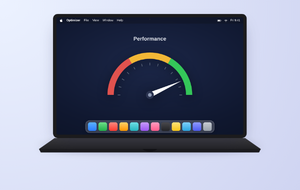
If you're comparing Avast Antivirus vs Internet Security, you've probably noticed the names on Avast's website no longer match the ones in every review you read. Let us clear that up. And if you'd rather not weigh tiers at all, MacKeeper's Antivirus watches your Mac in real time and clears out malware, spyware, and adware before any of it settles in.
Avast Antivirus vs Internet Security: what changed?
If you've searched avast internet security vs avast antivirus recently and come away more confused than when you started, you're in good company—we get this question constantly.
Here's what happened. Avast retired its entire tiered paid lineup—Avast Pro Antivirus, Avast Internet Security, and Avast Premier—and folded all three into a single paid product called Avast Premium Security. Anyone holding an older license was migrated automatically, so if you bought Internet Security a few years back, what's actually running on your Mac today is Premium Security wearing an old name.
In practice, every advanced feature people associate with the Internet Security tier now sits in one plan, and Avast's site offers you exactly two consumer choices: free or paid. Based on our experience, most of the confusion traces back to review pages that still list four products Avast stopped selling years ago. If a comparison table shows you four columns, it's out of date.
If you're looking wider than one vendor, our roundup of the best antivirus for Mac compares the main players on detection rates and their impact on your system.
What Avast Antivirus includes?
Avast's free antivirus sticks to core protection: viruses, malware, spyware, ransomware files, and the other everyday threats that arrive with downloads and email attachments. Avast pitches it as basic internet security for general device safety, and as our tests show, that's a fair description of what you're getting.
Here's what you actually get on a Mac without paying a penny:
File Shield—checks every program stored on or run from your drive.
Web Shield—inspects incoming traffic before it reaches Safari or Chrome.
Mail Shield—screens incoming messages along with their attachments.
On-demand and scheduled scans—including any external drive you plug in.
All of that covers files Avast already recognizes. What it leaves alone is scams, phishing pages, network vulnerabilities, and ransomware that has to be identified by behavior rather than signature, and as we've noticed, those are the routes most Mac infections take now. Free antivirus handles yesterday's threats well. It's slower with today's.
That gap is exactly what we set out to close. MacKeeper's Antivirus watches your Mac continuously instead of waiting for you to remember a manual scan, and it quarantines anything suspicious before removing it, so nothing you still need disappears by accident.
If you suspect something has already slipped past you, here's how to scan for viruses on Mac properly.
A note from our experts:
Are you in search of a reliable antivirus solution for your Mac? If Avast doesn't meet your expectations, try out MacKeeper's Antivirus. MacKeeper is Apple-notarized and offers real-time antivirus protection, so it guards your files continuously and alerts you the moment a threat appears. It's also AppEsteem-certified—an award we're rather proud of.
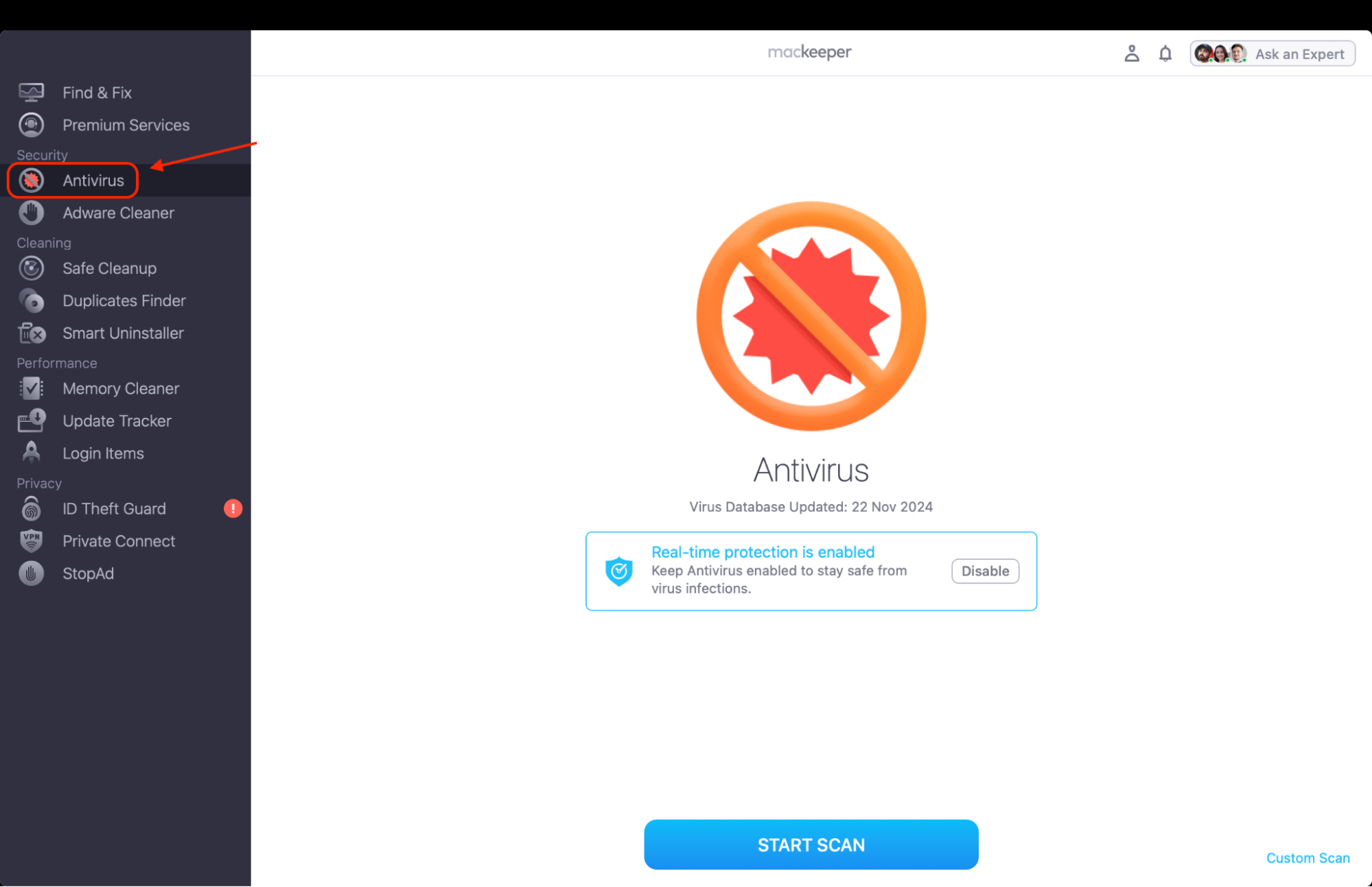
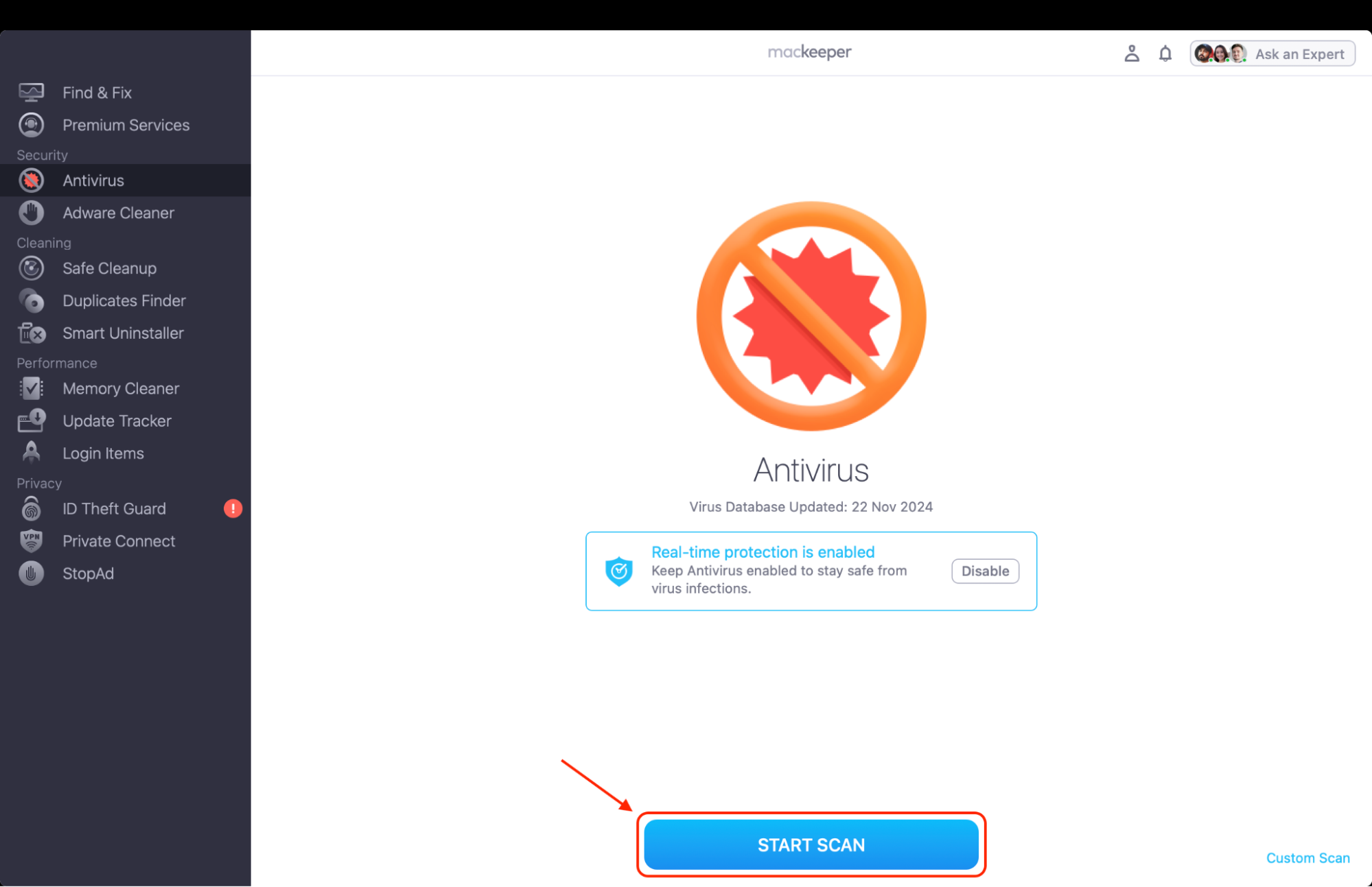
After enabling real-time protection, click Start Scan.
Review the list of threats found, click Move to Quarantine to block infected files, then Delete to remove them from your system.
Step 1. Open MacKeeper and select Antivirus from the left sidebar to reach the scanning optionsStep 2. Enable real-time protection, then click Start Scan to check every file on your Mac
What replaced Avast Internet Security?
Avast Premium Security is the short answer. It keeps everything in the free product and adds the layers that turn a scanner into a suite.
On a Mac, four of those layers are worth naming. Ransomware Shield watches for apps trying to alter or encrypt files inside your protected folders. Real Site confirms a page is genuine before you type your bank details into it, which shuts down the spoofed sites most phishing campaigns depend on. Network Inspector scans your Wi-Fi for weak router settings and devices you don't recognize. Email Guardian screens Gmail and Outlook for scam messages and infected attachments before they reach you.
For a wider look at the tactics all of this is defending against, read our guide to preventing cybercrime.
Avast Free Antivirus vs Avast Premium Security
This is the comparison that actually applies in 2026, and it's the one to run if you're still deciding between avast antivirus or internet security today.
Free Antivirus is enough if your habits are straightforward. You browse familiar sites, you download from the App Store or developers you trust, and you want a second opinion sitting alongside the protection Apple already builds into macOS. It scores well in independent testing and costs nothing, which is hard to argue with.
Premium Security starts earning its price when the stakes rise: you bank and shop online regularly, you share a network with housemates or family, you handle client files, or you've already had a phishing attempt land in your inbox. In our view, the phishing and ransomware layers are the two that justify the money on a Macintosh. The rest is convenience, and some of it you won't get on Apple hardware at all.
One thing we'd add from watching people make this call: a free tool you keep updated will always beat a paid one you install and forget about.
Curious how either stacks up against a Mac-native option? Our MacKeeper vs Avast breakdown puts them side by side.
Main differences between Avast Antivirus and Avast Internet Security
Setting the naming aside, the real question is how a stripped-back antivirus differs from a full security suite. We've set both tiers against the points that matter most when you're running a Mac rather than a PC.
Comparison point
Avast Free Antivirus
Avast Premium Security
Protection scope
Known viruses, malware, and spyware matched against signatures
Adds behavior-based monitoring that reacts to suspicious apps, not just known files
Online threat coverage
Web Shield checks traffic before it reaches your browser
Adds Real Site, which confirms a page is genuine before you enter credentials
Firewall features
None on Mac; macOS relies on Apple's built-in firewall
Advanced firewall on Windows only; Mac users still use Apple's firewall
Ransomware protection
Detects ransomware files it already recognizes
Ransomware Shield blocks unauthorized apps from altering protected folders
Phishing defense
Not included
Real Site plus Email Guardian screening for Gmail and Outlook
Privacy tools
Basic spyware detection only
Network Inspector identifies weak router settings and unknown devices
Suitability
Light users on a single Mac or MacBook
Households, remote workers, and anyone banking or shopping online
In our experience, two rows decide it for most Mac owners: phishing defense and ransomware protection. Much of the rest is either handled by macOS already or simply unavailable on Apple hardware, which makes the gap between free and paid narrower on a Mac than the price difference suggests.
Whichever way you lean, your habits matter more than your software—read how to protect your privacy online for the changes that make the biggest difference day to day.
Avast Antivirus vs Internet Security: which one should you choose?
The decision is simpler than the product names make it look.
Go with Avast's free antivirus if you want essential protection against malware on a single Mac and you're happy letting Apple's built-in defenses cover the rest. Go with Avast Premium Security if you want ransomware, phishing, and network protection under one subscription, as long as you've accepted that several advertised features stop at the Windows border.
From what we can tell, though, the honest answer for plenty of Mac owners is neither. A tool built specifically for macOS tends to fit better than a Windows suite with the Mac parts carved out of it. If you do decide to switch, here's how to uninstall Avast on Mac cleanly.
Conclusion
Comparing Avast Antivirus vs Internet Security is now a legacy question. If you're tired of guessing which tier protects your Mac, MacKeeper's Antivirus by Clario Tech scans in real time and quarantines threats. We suggest downloading MacKeeper and starting your first scan already today to feel the difference.
We respect your privacy and
use cookies
for the best site experience.
Privacy Preferences Center
We use cookies along with other tools to give you the best possible experience while using the
MacKeeper website. Cookies are small text files that help the website load faster. The cookies we
use don’t contain any type of personal data meaning they never store information such as your
location, email address, or IP address.
Help us improve how you interact with our website by accepting the use of cookies. You can change
your privacy settings whenever you like.
Manage consent
All cookies
These cookies are strictly necessary for enabling basic website functionality (including page
navigation, form submission, language detection, post commenting), downloading and purchasing
software. The website might malfunction without these cookies.