Is CCleaner safe enough to trust with your files, or do its old security headlines mean you should look elsewhere? If you’d rather clean your Mac without that worry, MacKeeper’s Safe Cleanup finds caches, logs, and other junk in one scan and lets you choose what goes, so your personal files stay put.
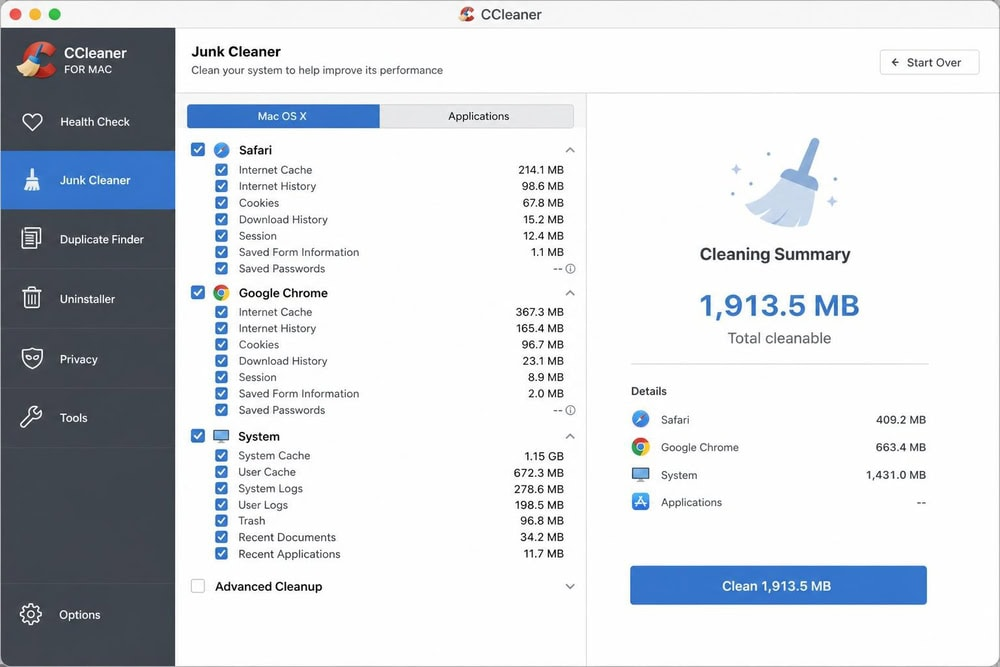
CCleaner is a cleaning and optimization app for Windows, Mac, and Android, created by Piriform and now owned by Gen Digital. It scans caches, logs, download histories, and the Trash, then shows you what it found so you can keep anything you need before it frees up the space.
On Windows, it adds a registry cleaner, a driver updater, and a tool to wipe free space. The macOS version is lighter, with tools such as Clean Clutter, Find Duplicates, and Uninstall Apps. For a hands-on look at how it performs on Apple computers, read our CCleaner for Mac review.
Is CCleaner legit?
Yes, CCleaner is legit. Piriform released it in 2004, and it’s been one of the most widely used cleaning utilities ever since. Downloaded from the developer’s website or a trusted app store, it’s genuine software rather than malware or a scam.
The catch is where you download it from. Unofficial mirrors and “cracked” Pro versions circulate online, and in our experience, most stories about CCleaner infecting a computer trace back to one of these copies rather than to the real app.
Who owns CCleaner?
CCleaner is owned by Gen Digital, the company behind Norton, Avast, and AVG, though it’s still developed under the Piriform name.
Piriform, a London software company, built CCleaner for Windows in 2004 and later brought it to Macintosh computers and Android phones. Avast bought Piriform in July 2017, and in 2022 Avast merged with NortonLifeLock, after which the combined business renamed itself Gen Digital.
This gives CCleaner a large security company’s backing but also ties it to its parent’s reputation. In 2024, the US Federal Trade Commission ordered Avast to pay $16.5 million over browsing data sold through its Jumpshot subsidiary, a case unrelated to CCleaner that still colors how people see the brand.
Is CCleaner safe to use?
For most people, CCleaner is safe to use as long as you download the official version and review what it’s about to delete. Current releases contain no known malware, the installers are digitally signed, and the default settings skip high-impact items such as saved browser passwords. The real risks come from unofficial downloads.
That said, safe isn’t the same as necessary. Clearing caches too often makes your browser and apps feel slower while they rebuild that data, and as we’ve noticed, the real space hog is usually a few forgotten large files.
Privacy is the other part of the picture. CCleaner collects some anonymous usage data, which you can limit in its settings, and in 2018 it reversed an update that made the Windows Active Monitoring feature harder to switch off.
If your main goal is freeing up disk space on Mac, the built-in storage tools and a careful manual cleanup can go a long way, even on a MacBook with a small SSD.
A note from our experts:
Are you looking for a cleaner that fits naturally into your Mac routine? If CCleaner doesn’t meet your expectations, try MacKeeper’s Safe Cleanup. Our tool finds caches, logs, unused language files, and other junk in a single scan, then shows you what it found so you decide what goes. MacKeeper protects your Mac from clutter while leaving your documents and photos untouched. MacKeeper offers memory optimization as well, so you can free up RAM from the same app.
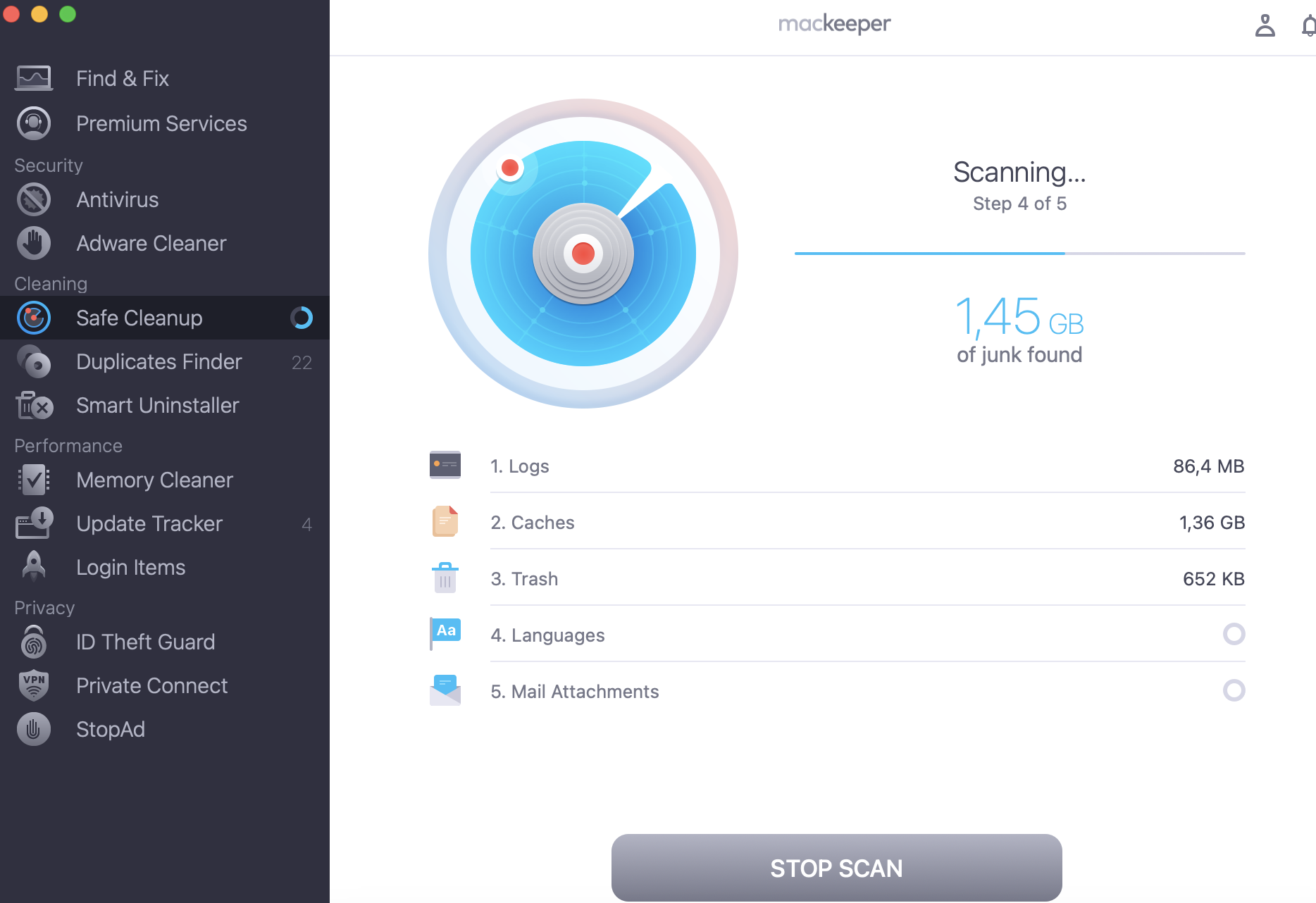
Click Start Scan and wait while MacKeeper checks your drive.
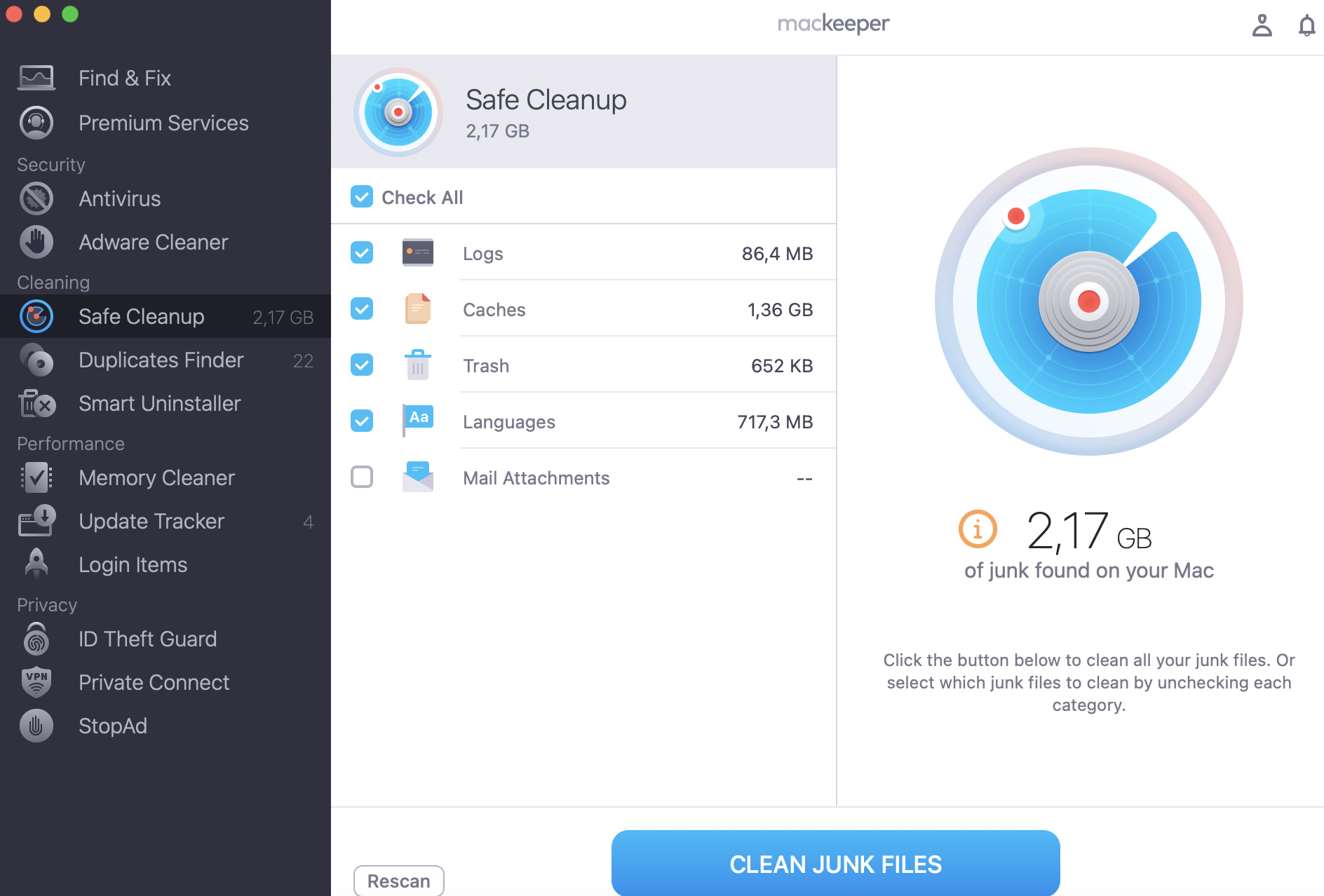
Review the categories found, such as Logs, Caches, Trash, Languages, and Mail Attachments, then click Clean Junk Files to remove them.
Step 1. Open MacKeeper and select Safe Cleanup from the left sidebar, then click Start ScanStep 2. Review the junk categories MacKeeper found, then click Clean Junk Files to remove them
Has CCleaner faced any security incidents in the past?
Yes. CCleaner was hit by a supply-chain attack in 2017, and attackers tried to repeat it in 2019. The first time, a tainted version reached users, while the second time, Avast caught the intrusion before any compromised build shipped.
Here’s what happened in each case:
The 2017 supply-chain attack. Attackers slipped a backdoor into the 32-bit Windows build of CCleaner 5.33, which about 2.27 million people downloaded before security researchers flagged it. Avast shut down the attackers’ server, pushed a clean update, and rebuilt CCleaner with a new certificate. The Mac version wasn’t affected.
The 2019 network breach. An attacker used stolen credentials to get into Avast’s internal network, apparently aiming at CCleaner again. Avast paused releases, checked earlier builds and found no tampering, then pushed out a re-signed update and revoked the old certificate.
In 2023, some CCleaner customers’ names, contact details, and billing addresses were also exposed through the wider MOVEit file transfer attack, although the app itself wasn’t involved.
So, is CCleaner still safe after all this? Our team has found no reported compromise of the app since 2017, which suggests the fixes made after the first attack work.
What should you consider when using CCleaner?
Whether CCleaner is safe or not depends largely on how you use it, and two areas deserve the most attention.
1. Understanding Registry Cleaner feature
The Windows registry is a database where the operating system and apps store their settings. CCleaner’s Registry Cleaner removes invalid entries, such as references to uninstalled software. In practice, this rarely brings a noticeable speed gain, while deleting the wrong entry can break an app.
That’s why you should always agree when CCleaner offers to back up the registry, so you can restore the .reg file with a double-click if something stops working. Mac users can skip this part, since macOS doesn’t have a registry.
2. Reviewing installer options and preferences
Free utilities often pay their way through bundled offers. The CCleaner installer for Windows has at times included pre-selected extras, such as Avast antivirus or Google Chrome, which led Microsoft Defender to flag some installers as potentially unwanted in 2020.
Our advice is to read every setup screen and deselect the checkbox next to any offer you didn’t ask for, then review the app’s startup and data sharing preferences.
How to use CCleaner safely and effectively?
If you still want to keep the app, a few habits make CCleaner reliable. In our view, it works well as an occasional tidy-up tool rather than a daily ritual. And if it isn’t for you, you can uninstall CCleaner along with its leftover files.
1. Download strictly from official sources
Download CCleaner only from ccleaner.com, the Microsoft Store, Google Play, or another source the developer lists. This ensures the installer carries a valid digital signature and hasn’t been modified.
Skip cracked versions and download portals that wrap the installer in their own setup wizard, because that’s how spyware usually sneaks in. On a Mac, Gatekeeper also checks that the app is notarized by Apple before its first launch.
2. Customize cleaning settings and background monitoring
We’ve noticed that a few minutes of tweaking keeps CCleaner helpful instead of annoying. On Windows, open the Smart Cleaning settings to control background monitoring and pop-up prompts. On a Mac, the main job is choosing which file categories get removed.
To control what CCleaner removes on your Mac, go through this routine:
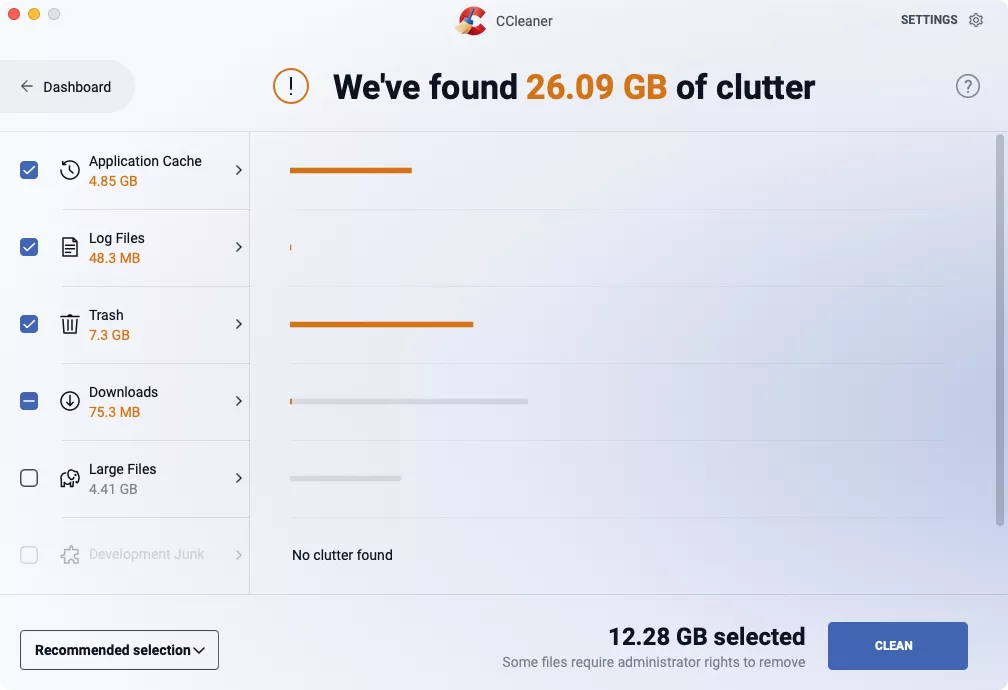
Open CCleaner on your Mac and select Clean.
Let the app scan your drive, then deselect any category or file you want to keep.
Confirm the cleanup, then repeat it in the browser cleaning tool, keeping cookies for sites you stay signed in to.
Step 1. Open CCleaner and select Clean from the main window. Review the results and deselect anything you want to keepStep 2. Confirm the cleanup, then repeat it in the browser cleaning tool
What are common alternatives to CCleaner?
Common alternatives to CCleaner include the built-in cleanup tools in Windows and macOS, the open-source BleachBit, and dedicated Mac utilities such as MacKeeper. The right choice depends on your operating system.
Here are the options we’d look at first:
Storage Sense and Disk Cleanup. Both come with Windows and remove temporary files and old update data, and Storage Sense can run on a schedule.
BleachBit. This free, open-source cleaner for Windows and Linux offers detailed control and file shredding, although its interface feels dated and it has no macOS version.
macOS Storage settings. Open System Settings, go to General, and click Storage to review large files and turn on automatic Trash emptying.
MacKeeper. This macOS utility brings junk cleanup, duplicate search, app removal, and security tools together in one place.
For a closer comparison of features and pricing, see our guide to choosing an alternative for CCleaner.
Can CCleaner be trusted?
So, is CCleaner safe? Today, the official app is a legitimate and reasonably secure cleaner, and we consider CCleaner trustworthy for basic cleanup as long as you download it from the developer, skip bundled offers, and review results before deleting anything. Its 2017 breach is part of its history, but the fixes that followed have held up.
Still, if you’re tired of second-guessing every checkbox, MacKeeper’s Safe Cleanup finds caches, logs, and other junk in a click and leaves your personal files untouched. MacKeeper offers adware and malware removal in the same app, and MacKeeper is AppEsteem-certified, so cleanup and security sit under one roof.
We respect your privacy and
use cookies
for the best site experience.
Privacy Preferences Center
We use cookies along with other tools to give you the best possible experience while using the
MacKeeper website. Cookies are small text files that help the website load faster. The cookies we
use don’t contain any type of personal data meaning they never store information such as your
location, email address, or IP address.
Help us improve how you interact with our website by accepting the use of cookies. You can change
your privacy settings whenever you like.
Manage consent
All cookies
These cookies are strictly necessary for enabling basic website functionality (including page
navigation, form submission, language detection, post commenting), downloading and purchasing
software. The website might malfunction without these cookies.