While searching for the best Mac for students, don’t forget to secure your connection to protect your data—both on your current machine and on a potential new one. MacKeeper’s Private Connect can do it easily—it encrypts your data when you go online, providing a safer browsing experience.
Although colleges have computers that students can use, life is much easier if you have your own. And Apple systems are a great choice for students. MacBooks give you the freedom to work from anywhere, but iMacs and Mac minis can be good Macs for students as well.
Ultimately, the best Mac for you, if you’re a student, depends on how you’ll be using it and what kind of work you do. If you need a lot of screen space, for example, a desktop Mac might be better than a laptop.
In this guide, we’ll look at some of these factors to choose the best Macs for students.
A note from our experts:
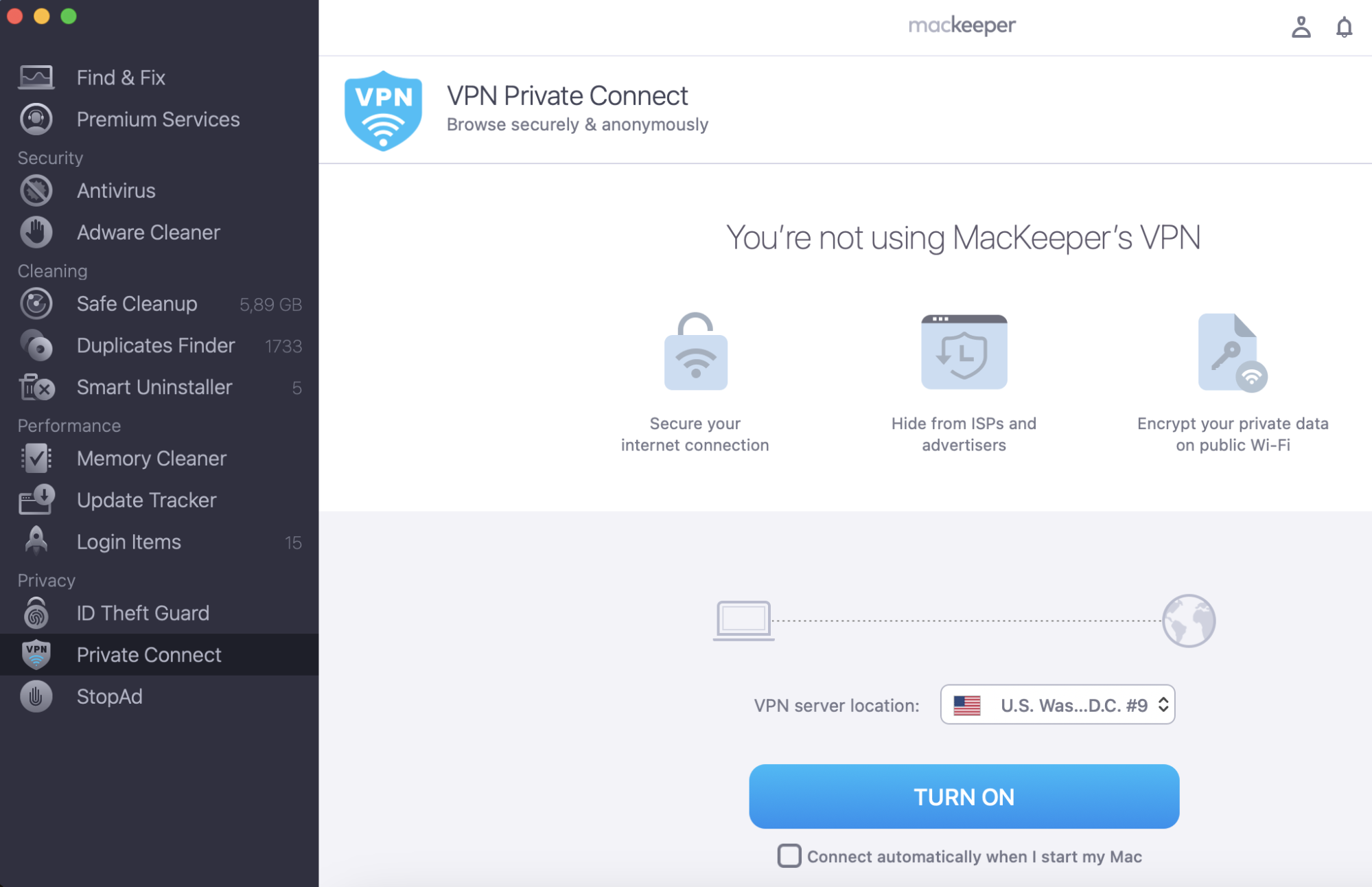
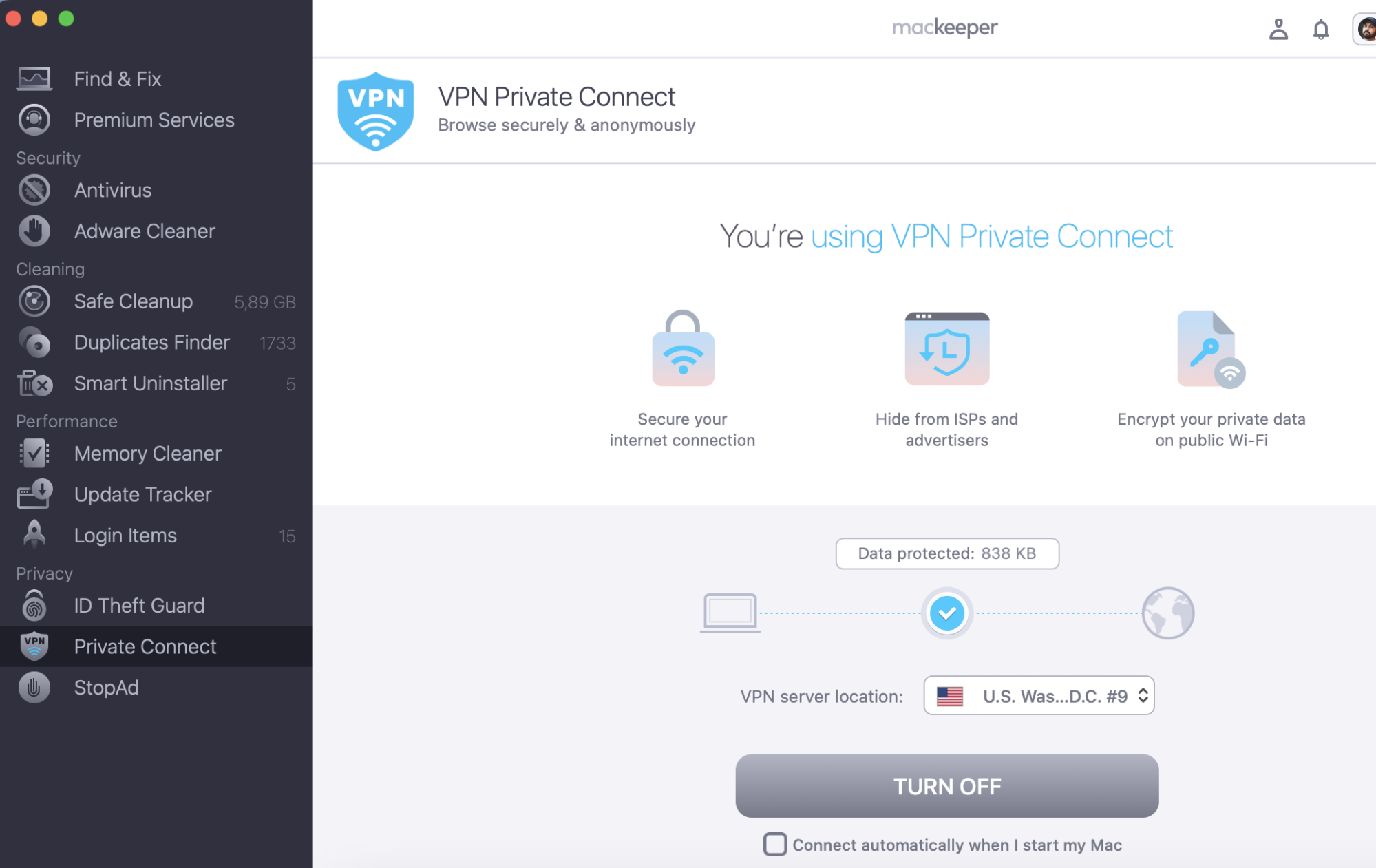
As a student, you’ll likely spend a lot of time researching articles on the web, including public ones. When you’re doing that, you want to stay private and protected. So try out MacKeeper’s VPN Private Connect feature, and browse in peace.
Step 1. MacKeeper > Private Connect > choose the location > Turn OnStep 2. Click Turn Off when complete browsing
You can try out MacKeeper for free now. It’s packed with other features, and you get one free fix, so you can see it in action.
Navigate through our top picks:
Best for portability: MacBook Air (2020)
Best desktop: iMac (2021) - best desktop Mac for students
Best for students on a budget: Mac Mini (2020, M1 version)
Choosing the best Mac for education
Macs — especially Apple laptops — are hugely popular among students. They're portable and fast, robustly built, and have a longer battery life compared to other popular laptops.
A Mac you buy for education will provide you with support throughout your entire course and will likely be a computer you’ll want to (and be able to) carry on using long after you graduate.
Choosing the best Mac for college depends on the kind of student you are, the type of assignments you get, and your general expectations from a computer.
Choosing the right Mac for your college course
As we previously mentioned, the choice of the best Mac for school depends on your major. If you’re studying a technically demanding major such as photography, coding, music production, or filming, we recommend you look for the best Mac for your profession — not just a laptop for a student. You will need this device beyond your graduation as a tool to complete assignments at work.
On the other hand, students who aren’t embarking on a creative specialization don’t need their computer to have that much power. Instead, you should look for a light and small device that you can easily carry around and show presentations whenever you need it.
You may not need that much RAM, but you might want to look into getting bigger storage for all that school-related paperwork, essays, and presentations. If you don’t want to pay for additional gigabytes on the Mac, consider buying an external disk or, to save even more money, extra cloud space. You can read more in our guide on how to check disk space on Mac.
The best Macs for college
Because the requirements of different courses can vary so much, the best Macs for each of them will vary too. Based on that assumption, here are the best Macs for college right now.
MacBook Air (2020) — best for portability
Apple released the 13.3-inch MacBook Air in 2020. Like all of Apple’s new computers, it uses the company’s own M1 processor, which means it’s fast and power-efficient. It boasts up to 15 hours of wireless web use on one charge, which is impressive.
The base model costs only $999 and has all the specs that a student might want and more. The 13.3-inch LED-backlit IPS display with True Tone technology has a resolution of 2560x1600 at 227 PPI and supports millions of colors. The internal SSD has 256GB configurable to 2TB with 8GB of unified memory. The cheaper version has a seven-core GPU built into the M1 chip, while the more expensive version has an eight-core GPU.
The MacBook Air weighs 1.29kg (2.8lbs), making it exceptionally portable and compact. If you feel like the 13-inch screen is not enough for you, you can connect an external display with up to 6K resolution at 60Hz.
If you ever need to charge your phone with the laptop, connect an external drive, printer, or mouse, Air has two external Thunderbolt 3 ports. And the final touch for environmentally conscious people: it’s made out of 100% recycled aluminum and at least 35% recycled plastic.
13-inch MacBook Air (2020) Specs
CPU
Apple M1 Chip
GPU
Seven-core integrated GPU or eight-core integrated GPU
RAM
8GB unified memory
Storage
Basic: 256GB
Configurable to: 2TB
Display
13.3-inch IPS display with 2560x1600 resolution
Battery life
Up to 15 hours using wireless web. Up to 18 hours watching movies.
Ports
Two Thunderbolt 3
Weight
1.29 kg (2.8lbs)
iMac (2021) - best desktop Mac for students
There are currently two iMac models available, and they’re both excellent. The one we haven’t chosen here is the 27-inch iMac, which is the biggest Mac you can buy. If you’re studying any kind of design course, it’s the best model available. It’s fast, stylish, and has an amazing 5K Retina display.
So why is it not our top iMac for college students? Because it uses an Intel processor, and Apple is moving all its devices over to its own chips. Now the new M1 iMac is out, we think it’s best to have the most future-proof technology. It’s smaller, but its 24-inch screen is still plenty big enough. And it’s about $500 cheaper, so that’s a big plus point too.
As well as the M1 processor, the new iMac comes with a 256GB SSD, configurable up to 2TB. It also has a 1080 FaceTime HD camera, a 4.5K display (4480x2520), two Thunderbolt 3 ports and a power connector that attaches magnetically.
It also looks fantastic. The screen is only 11.5mm thick, and this iMac comes in a range of bright colors. It weighs 4.46kg (9.83lbs), so it’s not too heavy to move around your dorm room as needed.
Mac Mini (2020, M1 version) — best Mac for students on a budget
The Mac mini is another budget device by Apple that’s great for homeschoolers and students in distance learning programs. This small and light desktop computer packs a lot of power in it and is a great alternative for those who want that special Apple experience for little money. Prices start from $699.
We’ve chosen the M1 version here, because it’s so well priced, and it uses Apple fast, future-proof chip. But you can still buy a more expensive Mac mini with a six-core Intel Core i5 processor. In some cases that might be a better option, like if you want to run Windows in Boot Camp.
But for most people, the M1 Mac mini will be ideal. As well as the Apple processor, it comes with a 256GB SSD configurable up to 2TB, and 8GB of unified memory.
The only downside is that the Mac mini doesn’t come with a display. However, you can connect two displays at a time: one with up to 6K resolution at 60Hz via Thunderbolt and another with up to 4K resolution at 60Hz via HDMI. It also has a couple of traditional USB-A ports for peripherals and so on.
Mac mini (2020, M1 version) Specs
CPU
Apple M1 Chip
GPU
Eight-core integrated GPU
RAM
8GB unified memory
SSD
Basic: 256GB
Configurable to: 2TB
Ports
Two Thunderbolt 3
Two USB-A
Gigabit Ethernet
HDMI 2.0
Apple education pricing
You can save on a new Mac for your studies with Apple Education Pricing. As well as a discount on Macs, you get free AirPods, and you can save 20% on AppleCare. Plus, you get three free months of Apple Music and Apple TV.
Education Pricing is available on eligible Mac models for college students and their parents, as well as faculty, staff, and homeschool teachers. Please note that you will be asked to provide acceptable documentation as proof to get the discount.
How to prepare your Mac for college
A brand new Mac won’t need much preparation. Just install all the apps you’re going to need, and make sure you’ve got an antivirus and anti-malware for Mac tool. But if you’ve bought a second-hand Mac for college, it might need cleaning up. In that case, use MacKeeper to remove unwanted apps, junk files, duplicates, and so on.
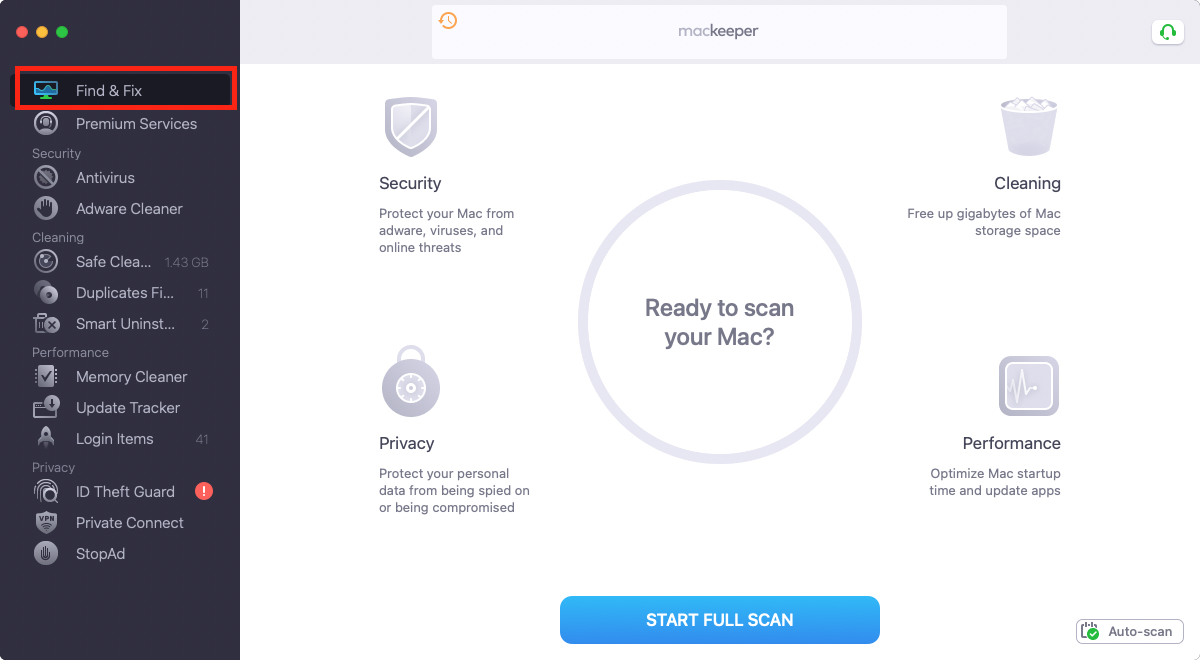
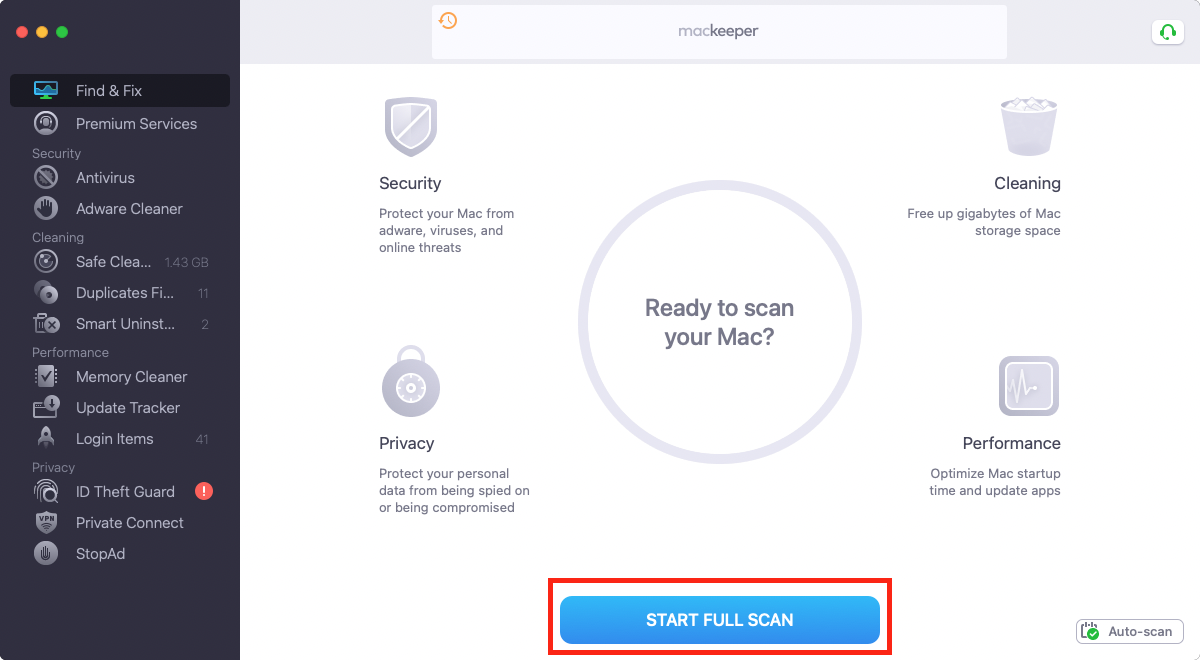
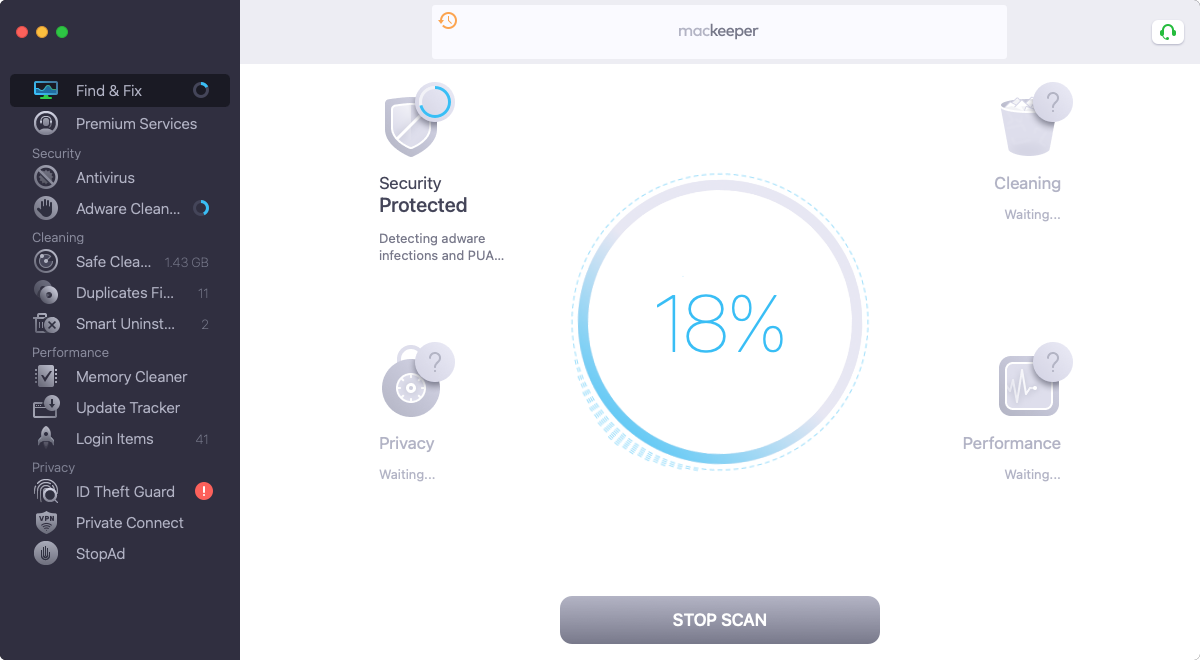
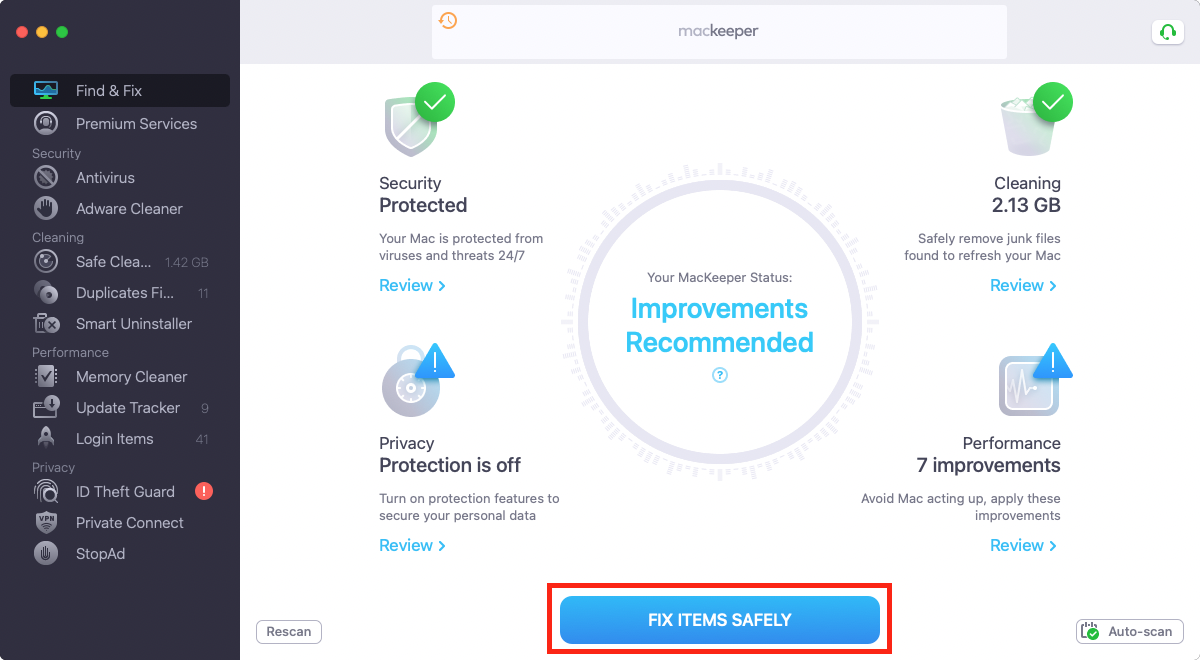
Here’s how to run a full Find & Fix scan in MacKeeper:
Step 1. Open MacKeeper and click on Find & FixStep 2. Click the Start Full Scan buttonStep 3. Wait until the scan is completedStep 4. Click on Fix items safely to complete the cleanup
But if you’ve bought a second-hand Mac for college, it might need cleaning up. In that case, use MacKeeper to remove unwanted apps, junk files, duplicates, and so on. It’s one of the best Mac cleaning software you’ll find if you’re after an all-in-one security and optimization tool.
Conclusion
We listed the best options according to the overall combination of price, performance and portability that you need as a student. Choose the best Mac according to your preferences and lifestyle, and don’t forget about the special student discount!
It could be that the best Mac for your college course is not a new model at all.
Students looking for a bargain might also want to check out refurbished and second-hand Apple laptops. You can get a vintage MacBook from a third-party vendor if you don’t mind old-school technology, or browse the Apple website for offers on approved devices.
FAQ
Are Macs or PCs better for students?
It depends on what you’re studying. For creative or design courses, a Mac is often the best option. But other courses might also require you to run Windows-only software. That’s pretty rare, though, and in most cases, a Mac is going to be a good choice, because Macs are reliable and stylish. And MacBooks offer exceptional battery life too.
Should I choose a MacBook or iMac for college?
If portability is your primary concern, a MacBook Air is ideal. For a bit more power, a MacBook Pro is your best choice. But if you just want raw power, and you don’t need to take your computer on the move, then an iMac or Mac mini is the way to go. But whichever one you choose, they’re all great Macs for students.
What percentage of college students use Macs?
According to a survey by the Apple device management company, 71% of students across five countries use or would prefer to use a Mac. This is a huge statistic demonstrating just how popular they are among young people — both due to their exterior design and the advantages of macOS.
Why do most college students use Macs?
Apple devices are popular for their sleek design, superb image quality and easy-to-use operating system. It’s a well-known fact that macOS is far less prone to malware infections and viruses than any other operating system. They’re also robust, thanks to their metal bodies, which protect them from physical damage.
We respect your privacy and
use cookies
for the best site experience.
Privacy Preferences Center
We use cookies along with other tools to give you the best possible experience while using the
MacKeeper website. Cookies are small text files that help the website load faster. The cookies we
use don’t contain any type of personal data meaning they never store information such as your
location, email address, or IP address.
Help us improve how you interact with our website by accepting the use of cookies. You can change
your privacy settings whenever you like.
Manage consent
All cookies
These cookies are strictly necessary for enabling basic website functionality (including page
navigation, form submission, language detection, post commenting), downloading and purchasing
software. The website might malfunction without these cookies.