The battle over which Mac is the best for gaming will never end. Just choose a Mac with sufficient RAM. And if you ever feel it performs poorly, use MacKeeper’s Memory Cleaner to free Mac’s resources for the processes you really need.
The absolute best Mac for gaming today relies on Apple’s high-end M-series Max or Pro chips, which deliver desktop-class graphics power and hardware-accelerated ray tracing that completely outclass older hardware.
Gone are the days of choosing between the limited graphics of older Apple Silicon or the compatibility of Intel processors, as modern macOS gaming relies entirely on modern Apple Silicon architecture. If you’re looking for a new Mac to play video games on, your primary focus will be balancing raw GPU core counts with active cooling to sustain peak frame rates during intense gaming sessions.
A note from our experts:
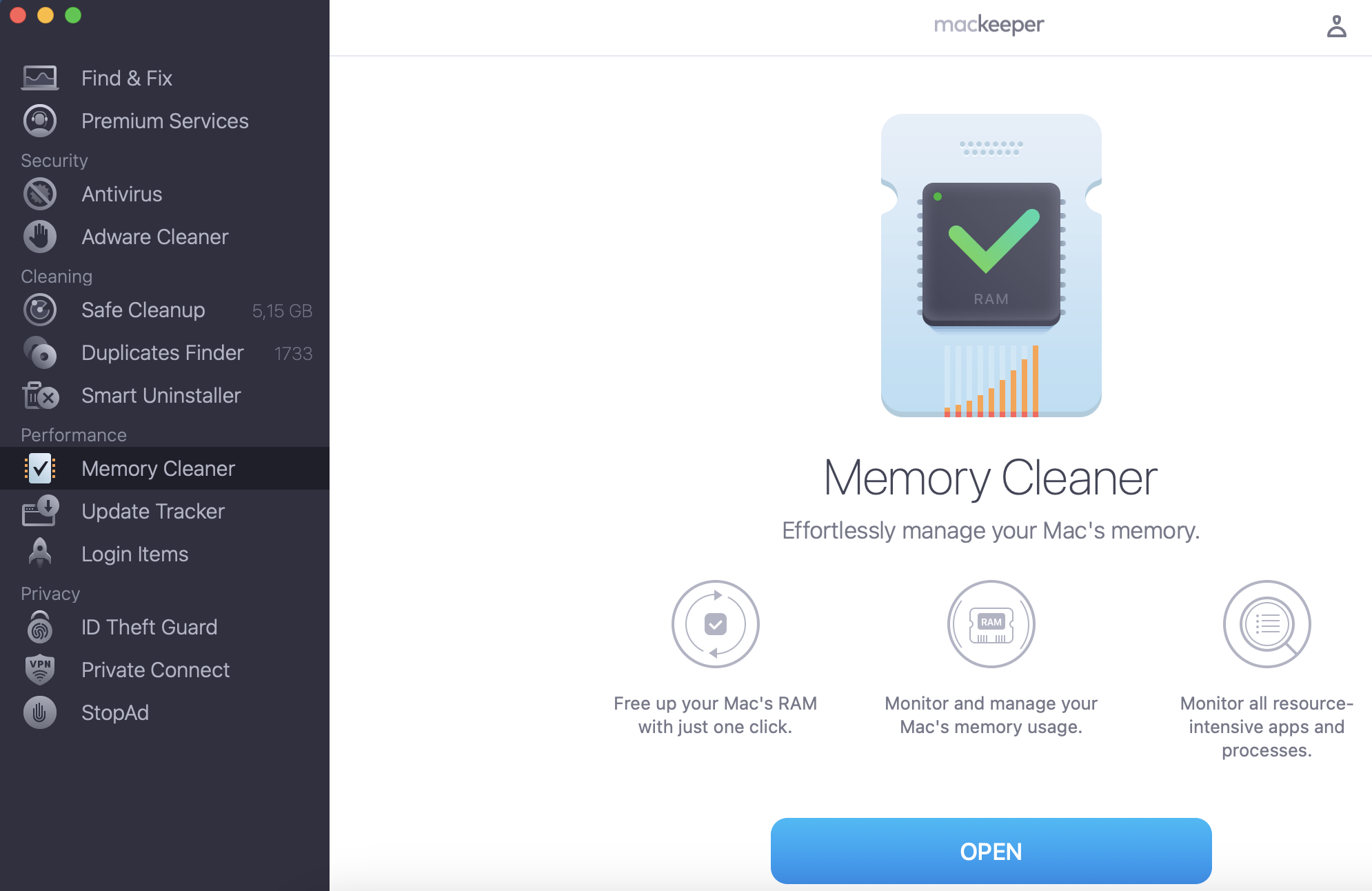
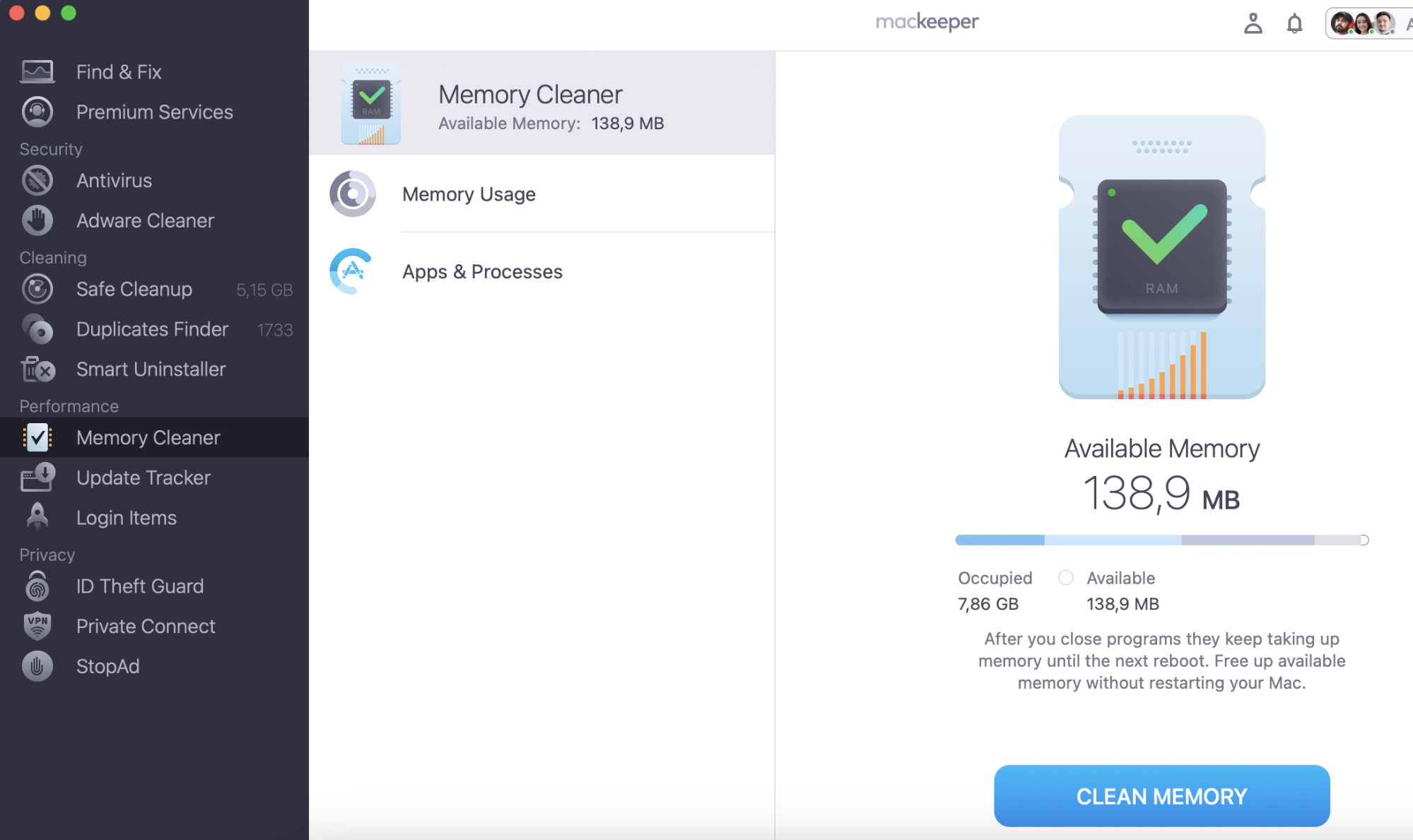
Games require a large amount of RAM on your Mac. Your MacBook may start to run more slowly. It's time to clean up your RAM. MacKeeper's Memory Cleaner will do it in a few clicks, and you can get back to your favourite games.
We’ll help you to decide between the two options below, as we look at each of the best Mac models for playing games:
MacBook Pro 16-inch (M5 Max)
MacBook Pro 14-inch (M5 Pro)
MacBook Air 15-inch (M5)
MacBook Pro 14-inch (M4 Pro)
MacBook Air 13-inch (M5)
Mac model
Best for
Pros
Cons
MacBook Pro 16-inch (M5 Max)
Ultimate AAA games and top-tier GPU performance
Massive 40-core GPU, huge screen, and ultra-smooth 120Hz ProMotion display
Extremely expensive, heavy, and bulky for a laptop
MacBook Pro 14-inch (M5 Pro)
Balanced high-performance AAA and esports gaming
Active dual-fan cooling prevents slowdowns, 120Hz screen, and highly portable layout
Premium price point and total overkill for basic casual titles
MacBook Air 15-inch (M5)
Immersive casual and cloud gaming
Large immersive screen space, completely silent design, and highly portable
No internal fans, meaning it slows down automatically during long, heavy AAA sessions to stay cool
MacBook Pro 14-inch (M4 Pro)
Value-focused mid-range AAA and sustained gaming
Active dual fans for stable frame rates, dedicated Pro graphics cores, and cheaper than M5 models
Missing the minor architectural efficiency updates of the newer M5 line
MacBook Air 13-inch (M5)
Budget-friendly casual, indie, and cloud gaming
Most affordable M5 model, ultra-light design, and exceptionally long battery life
Small display for gaming, and the fanless structural layout limits its ability to handle heavy AAA titles
What should you look for when choosing a Mac for gaming?
You need a Mac that is powerful and stays cool so your games run smoothly. Apple stopped making Intel Macs, so you’ll have to look into getting a modern Apple Silicon Mac. Here are the nuances we recommend to pay attention to:
CPU: Don’t look for Intel i5 or i7 processors because modern Mac games only work on Apple Silicon. A basic M-series chip is fine for normal games, but Pro or Max chips are much better for heavy games.
GPU: Apple has built graphics power directly into the main chip in modern Macs. For heavy 3D games, we recommend you get a Pro or Max chip, as they use hardware ray tracing to make lighting and shadows look realistic.
RAM (Memory): For gaming, you need more than the standard 16GB new Macs start with. On a Mac, the graphics chip shares memory with the main system. We recommend buying 24GB or 32GB of RAM so your heavy games don’t slow down.
Display: All Macs have sharp screens, but the speed of the screen matters. The MacBook Air and base iMac are limited to 60Hz. The MacBook Pro has a faster 120Hz screen, which makes fast action look completely smooth.
Ports: You need ports to plug in a gaming mouse, keyboard, or extra storage. Desktops like the Mac mini or laptops like the MacBook Pro have plenty of ports. The MacBook Air only has two ports, so you’ll need to buy an extra USB hub.
Price: The cheapest gaming desktop is the Mac mini at $599, and the cheapest laptop is the MacBook Air at $999. However, a high-end MacBook Pro with a Max chip and cooling fans can cost over $3,000.
Best MacBooks to choose for gaming
The MacBook Pro 16-inch with the M5 Max chip is the most powerful computer Apple makes for gaming. It gives you top-tier graphics performance on a beautiful, large screen. It is built for serious gamers who want to play heavy, demanding games at the highest visual settings with no slowdowns.
At the time of writing, Apple has released these M-series Mac models:
MacBook Pro 16-inch (M5 Max)
MacBook Pro 14-inch (M5 Pro)
MacBook Air 15-inch (M5)
MacBook Pro 14-inch (M4 Pro)
MacBook Air 13-inch (M5)
Generally speaking, no matter which M1 Mac you buy, you’ll experience similar gaming performance — and it will be excellent. However, because the M-series uses a totally different architecture to classic Intel chips, you’ll have far fewer compatible games to choose from.
Check out the Apple Gaming Wiki for an up-to-date list of what games are available for M-series Macs. This table clearly shows which games you can play natively, which Intel games still work through Apple’s Rosetta translation, which Windows games you can play through CrossOver and Parallels, and which ones you can’t play at all.
Unfortunately, the M-series chip doesn’t support running Windows in Boot Camp — so if you’re looking to run Windows on your Mac for a better gaming experience, you’ll be limited to using Parallels or CrossOver instead.
Of all the M-series Mac models, our recommendation would be to get either the MacBook Pro or the Air.
MacBook Pro 16-inch (M5 Max)
The MacBook Pro 16-inch with the M5 Max chip is the most powerful computer Apple makes for gaming. It delivers top-tier graphics performance on a beautiful, large screen. It’s built for serious gamers who want to play heavy, demanding games at the highest visual settings with no slowdowns.
Specification
Value
CPU
Up to 16-core CPU
GPU
Up to 40-core GPU with hardware-accelerated ray tracing
Display
16.2-inch Liquid Retina XDR with 120Hz ProMotion
Unified memory (RAM)
Configurable up to 128GB (Recommended: 32GB or higher)
Cooling system
Dual-fan active cooling (Sustains peak frame rates indefinitely)
Storage capacity
Starts at 1TB SSD (Configurable up to 8TB)
MacBook Pro 14-inch (M5 Pro)
The MacBook Pro 14-inch with the M5 Pro chip is the perfect sweet spot for performance and size, offering incredible speed in a highly portable design. Thanks to its active cooling fans, it can run heavy action and esports games for hours at stable frame rates without slowing down.
Specification
Value
CPU
Up to 16-core CPU
GPU
Up to 20-core GPU with hardware-accelerated ray tracing
Display
14.2-inch Liquid Retina XDR with 120Hz ProMotion
Unified memory (RAM)
Configurable up to 64GB (recommended: 24GB or 32GB)
Cooling system
Dual-fan active cooling (prevents thermal throttling)
Storage capacity
Starts at 512GB SSD (recommended: 1TB upgrade)
MacBook Air 15-inch (M5)
The MacBook Air 15-inch offers a great, immersive screen for casual and indie gaming while keeping the laptop incredibly thin and light. Because it has a completely silent, fanless design, it is best suited for lighter titles or cloud gaming services rather than long AAA gaming sessions.
Specification
Value
CPU
8-core CPU
GPU
10-core GPU with hardware-accelerated ray tracing
Display
15.3-inch Liquid Retina display (60Hz)
Unified memory (RAM)
Starts at 16GB (configurable up to 24GB)
Cooling system
Fanless (will lower performance under long, heavy gaming loads to stay cool)
Storage capacity
Starts at 256GB or 512GB SSD (fills up quickly with large games)
MacBook Pro 14-inch (M4 Pro)
The MacBook Pro 14-inch with the M4 Pro chip is a fantastic value-focused choice that still beats standard chips for sustained gaming sessions. It uses its built-in dual fans to maintain smooth performance in mid-range titles, making it an excellent alternative to the newer M5 models. Note that the 15-inch MacBook Pro has been discontinued by Apple.
Specification
Value
CPU
Up to 14-core CPU
GPU
Up to 20-core GPU with hardware-accelerated ray tracing
Display
14.2-inch Liquid Retina XDR with 120Hz ProMotion
Unified memory (RAM)
Configurable up to 64GB (highly capable at 24GB)
Cooling system
Dual-fan active cooling (maintains stable, high frame rates)
Storage capacity
Starts at 512GB SSD (Configurable up to 4TB)
MacBook Air 13-inch (M5)
The MacBook Air 13-inch is the most affordable and portable entry point into modern Mac gaming, making it ideal for gamers on the go. Its highly efficient chip easily handles lighter indie hits, emulation, and cloud gaming platforms, though its compact screen is less suited for complex 3D worlds.
Specification
Value
CPU
8-core CPU
GPU
Up to 10-core GPU with hardware-accelerated ray tracing
Display
13.6-inch Liquid Retina display (60Hz)
Unified memory (RAM)
Starts at 16GB (configurable up to 24GB)
Cooling system
Fanless (best for shorter gaming burst sessions)
Storage capacity
Starts at 256GB SSD (requires careful storage management)
Macs you should avoid buying if you’re a gamer
Some Macs currently on the market may be great for generic use, but will be a terrible choice for gamers. Most often this is due to the graphics card.
If you don’t go beyond light games such as Roblox, you’ll be fine even with a vintage model. However, if you usually go for more graphics-demanding games — like Fortnite or any other 3D action game — integrated graphics cards are incapable of running such high-end titles.
The computers that have an integrated GPU such as Intel HD graphics or an Intel Iris are unlikely to satisfy your gaming needs.
Out of all the Macs currently available on Apple’s website, these are the ones you should avoid as a gamer:
Any Intel-based MacBook Air or MacBook Pro
Any 21.5-inch or 27-inch Intel iMac
Any Intel-based Mac mini
Any modern Apple Silicon Mac configured with only 8GB of RAM
How do you optimize your Mac for gaming?
Gaming is one of the most resource-heavy tasks you can ask of a Mac. Choosing a great machine is the first step, but you also need to manage your system settings properly to keep everything running smoothly from Minecraft to heavy native AAA games. Use a Mac optimizer app for this.
Instead of using risky third-party software, here’s the best and safest way to optimize your Mac for gaming:
Use built-in storage tools: Modern games require massive amounts of storage space. To safely clear space, open System Settings > General > Storage to use Apple's free built-in tool to delete large files and clean your disk safely.
Turn on Game Mode: Modern macOS includes a built-in Game Mode that turns on automatically when you open a game in full-screen. It gives the game top priority on your CPU and GPU, while lowering background activity and reducing wireless lag for controllers.
Check game compatibility: Some popular competitive games like Fortnite can’t run natively on modern Macs due to software and developer restrictions. For these titles, you’ll need to use a cloud streaming service like GeForce NOW instead of downloading them to your hard drive.
Clear out some disk space to ensure you’ve got room to download and install the games you want to play. The easiest way to do this is using MacKeeper’s Safe Cleanup feature, which performs a full scan of your system to remove unnecessary junk files and free up space.
Use the Memory Cleaner to make sure you’ve got as much RAM as possible for your games to further boost performance.
Run the Antivirus scan to check for and remove any Mac malware that could be further clogging your machine, slowing it down, and using your precious resources for nefarious tasks like crypto-mining.
Step 1. Use MacKeeper’s Safe Cleanup toolStep 2. Run the Antivirus scan
FAQ
What is the best MacBook for gaming?
The 16-inch MacBook Pro configured with an M5 Max chip is the number one MacBook for gaming by far. It’s an absolute beast. It packs a huge 40-core GPU, handles realistic lighting beautifully with hardware ray tracing, and has a 120Hz ProMotion screen that makes fast-paced action look incredibly smooth. But let's be real—Apple laptops are expensive, and you can't upgrade them later. The right choice for you depends entirely on your budget and what you actually want to play.
Are MacBooks good for gaming?
Yes, MacBooks are good for gaming, though it essentially comes to choice. To be more precise, how much choice is afforded by Apple devices.
Although many AAA and indie titles have come to Mac recently, gamers still don’t have enough games to choose from. The small library of games supported by Mac is one of the reasons why Apple computers are not extremely popular among gamers.
Furthermore, online multiplayer games that use strict anti-cheat software (like Valorant, League of Legends, or modern Call of Duty titles) completely block macOS, preventing you from playing them without a cloud streaming service. To bypass the small native library, modern Mac gamers rely on translation software like CrossOver, Whisky, or Apple’s Game Porting Toolkit to run Windows games. While this helps open up thousands of titles, it requires extra setup and does not work perfectly for every game.
Another reason why we cannot recommend Apple for gamers is poor upgradability. The gaming community cares deeply about the ability to upgrade components, like swapping out an old graphics card or adding more memory over time, to keep up with rapidly changing technology. With Apple Silicon, the CPU, GPU, and RAM are permanently fused onto a single chip. This layout makes it completely impossible to upgrade your Mac's hardware after you buy it.
Is Mac or Windows better for gaming?
Windows. Every time.
Game developers used to be primarily Windows-oriented for a long time. However, Apple's powerful modern M-series chips have completely changed the landscape. Major studios are now actively porting heavy AAA games natively to macOS. Even with this progress, Windows still dominates because it gets almost every game release immediately, whereas Mac gamers must wait months or years for official ports.
Back in the day, you could only install Windows on a Mac via Boot Camp. Those days are long gone, so avid gamers lean on clever translation apps like CrossOver, Whisky, or Apple’s Game Porting Toolkit to trick Windows games into running directly inside macOS. Just a heads up though, these third-party tools aren't perfect. You'll often have to tweak settings to get things running, and some games won't open at all.
How do I choose a MacBook for gaming?
To choose a MacBook for gaming, forget older Intel models completely. Your options include either a light, fanless laptop or a high-end Pro laptop with active cooling fans.
If you’re simply looking for a laptop you can use for everyday tasks and casual or cloud gaming, we recommend the MacBook Air with a base M-series chip. But if you want to play demanding, modern AAA games, get a MacBook Pro with an M-series Pro or Max chip. These models include built-in dual fans that prevent the computer from overheating and slowing down your frame rates during long gaming sessions. Plus, they come with fast 120Hz displays.
How do I choose an iMac for gaming?
To choose iMac for gaming, opt for a model with the most powerful processor and graphics card you can afford. Even though this rule of thumb applies to all Apple computers, you need extra power to take the full advantage of the 4K Retina display.
Your best all-in-one desktop choice is the updated 24-inch iMac with an M-series processor. If you want to play heavy 3D titles on a desktop setup, skip the all-in-one iMac entirely. You’ll get much better gaming performance by pairing a standalone Mac mini (M5 Pro) or a powerful Mac Studio with a dedicated high-refresh-rate gaming monitor.
Can gaming damage my MacBook Pro?
No, a game can’t damage your MacBook. It may seem like it does, though, because as you play, the load on your Mac increases, which can lead to more vigorous work of the cooling fans and a rise in the temperature of the processor. The performance may drop, but it will restore as soon as your computer cools off — with no permanent damage done.
The MacBook Pro is equipped with sensors that track all parameters of your device. It’ll automatically and safely turn itself off if the sensors suggest it’s going to get dangerously hot. If you regularly use your Mac to its full capacity, we recommend using a cooling mat or a laptop stand to further cool it down.
Is a MacBook Air or Pro better for gaming?
The MacBook Pro is definitely the better choice for serious gaming, and it mostly comes down to cooling fans. When you’re running heavy 3D games, the Pro uses its fans to keep the hardware cool, meaning your frame rates stay rock-solid and smooth even during long sessions. Plus, it features a beautiful 120Hz ProMotion screen for ultra-fluid movement and gives you access to Apple's most powerful graphics chips.
The MacBook Air is completely fanless and silent, which is amazing for daily use but tough for gaming. If you try to play a demanding, modern game, the Air will heat up after about 20 minutes and will automatically slow itself down to cool off. When that happens, your game will start to stutter and drop frames. The Air is also limited to a standard 60Hz display.
The rule of thumb is simple: grab the MacBook Pro if you want to install and play heavy 3D games directly on your machine. The MacBook Air is a great way to save some cash, but only if you stick to lighter indie titles, casual games, or cloud streaming apps like GeForce NOW.
Do games slow down your Mac?
Depending on the requirements of the game that you’re playing and the specifications of your Mac, certain games may work slowly and inefficiently. However, when you quit the game, all of your laptop’s functions will go back to normal.
To make sure that nothing is causing your Mac to slow down, check the amount of free space on your internal drive. You will experience delays and kernel panics if you’re running out.
We respect your privacy and
use cookies
for the best site experience.
Privacy Preferences Center
We use cookies along with other tools to give you the best possible experience while using the
MacKeeper website. Cookies are small text files that help the website load faster. The cookies we
use don’t contain any type of personal data meaning they never store information such as your
location, email address, or IP address.
Help us improve how you interact with our website by accepting the use of cookies. You can change
your privacy settings whenever you like.
Manage consent
All cookies
These cookies are strictly necessary for enabling basic website functionality (including page
navigation, form submission, language detection, post commenting), downloading and purchasing
software. The website might malfunction without these cookies.